
The release of iOS 17 has transformed the traditional "My Card" feature from a static database entry into a dynamic, AI-driven digital identity known as the Contact Poster. For professionals leveraging the Apple ecosystem, this is not merely a cosmetic update; it is an automation of personal branding that utilizes the device's Neural Engine to ensure high-fidelity image segmentation and depth effects whenever you initiate a call.
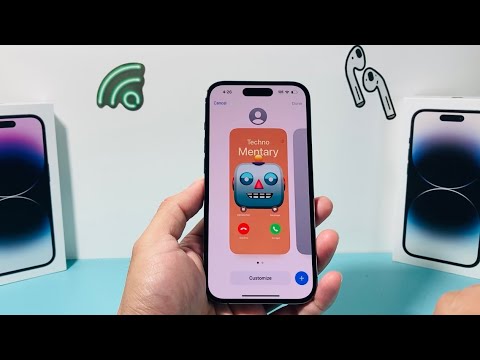
Step 1: Accessing the 'My Card' Configuration

To begin the setup, launch the Phone app and navigate to the Contacts tab, or open the standalone Contacts app. At the very top of the list, you will find your name labeled as "My Card." Tap this entry to enter your personal profile. Select the "Contact Photo & Poster" option to trigger the setup wizard.
Step 2: Customizing Your Visual Identity

iOS 17 offers four primary styles for your Contact Poster: Camera, Photos, Memoji, and Monogram. For maximum professional impact, selecting a high-resolution photo is recommended. Once a photo is selected, the iOS 17 software uses machine learning algorithms to identify the subject and separate it from the background. This allows you to apply a "Depth Effect," where your name appears layered behind the subject, creating a polished, three-dimensional look.
Step 3: Fine-Tuning with AI-Driven Filters

After selecting your image, swipe horizontally to cycle through various styles like Studio, Black & White, or Color Wash. The system automatically adjusts the lighting and contrast based on the image's metadata. You can also tap the font name to adjust the weight, color, and typeface of your display name. This ensures that your digital "calling card" remains legible across different display resolutions and lighting conditions on the receiver's device.
Step 4: Automation and Sharing Preferences
A critical component for efficiency is the Name & Photo Sharing toggle. To automate your professional presence, set this to "Contacts Only." This ensures that whenever you call a known colleague or client, your customized poster is pushed to their device automatically via iCloud, eliminating the need for them to manually update your contact photo.
AI Implementation Score
At 'Smart AI Fix', we evaluate software features based on their integration of automated intelligence and user efficiency. Here is how the iOS 17 'My Card' feature stacks up:
| Metric | Score (1-10) | Technical Reasoning |
|---|---|---|
| Image Segmentation | 9.5 | Real-time background removal using the A-series Neural Engine. |
| Sync Automation | 9.0 | Seamless iCloud-based distribution to verified contacts. |
| UX Efficiency | 8.5 | Reduces manual contact management for the recipient. |
By configuring your My Card profile correctly, you are optimizing the first impression you make during every digital interaction. The combination of Apple’s facial recognition technology and automated sync protocols makes this a mandatory setup for any tech-forward iPhone user.
