
Effective digital communication management on iOS requires a nuanced understanding of the iMessage protocol. Streamlining your professional or personal circles often necessitates the removal of participants from group threads to maintain focus and security. While Apple’s ecosystem emphasizes user-friendly interfaces, the specific logic governing group chat permissions is rooted in strict software prerequisites.
Software Prerequisites for Participant Removal

Before attempting to remove a contact, you must ensure the group environment meets Apple’s architectural requirements. First, the group must be an iMessage group (indicated by blue text bubbles). If any participant is using SMS/MMS (green bubbles), the native "Remove" functionality is disabled due to carrier-side protocol limitations. Second, the group must consist of at least four participants initially; Apple’s software logic prevents a group from being reduced to a 1-on-1 conversation via the "Remove" feature—in that instance, a new thread must be initiated.
The Technical Workflow: Step-by-Step Execution
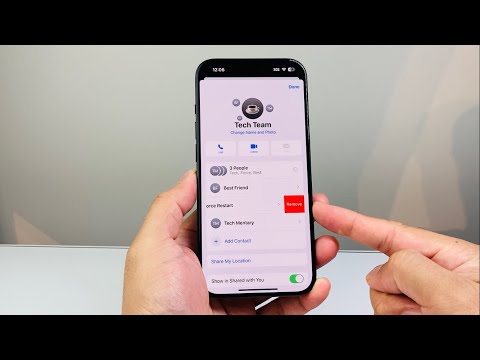
To remove a participant from an active iMessage thread on your iPhone, follow this optimized workflow:
1. Open the Messages app and navigate to the specific group thread you wish to moderate.
2. Tap the group icons (or the group name) located at the top center of the interface to reveal the metadata and settings pane.
3. Tap the info button (indicated by the number of people) to expand the list of active participants.
4. Locate the contact you intend to remove. Swipe left on their name to trigger the hidden contextual menu.
5. Tap the red Remove button. A confirmation prompt will appear; confirm the action to finalize the deletion.
Once executed, the removed individual will receive a notification within the thread stating they have left the conversation, and they will no longer be able to view new incoming messages or contribute to the thread. However, their device will retain the historical data of the chat up until the point of removal.
Troubleshooting and Software Constraints
If the "Remove" option does not appear after swiping left, it typically indicates a protocol mismatch. This occurs if the group contains a non-Apple user or if the thread only has three participants. In such cases, the current software architecture requires the creation of a new group thread to exclude the unwanted contact. Furthermore, ensuring your device is running the latest iOS iteration is vital for maintaining the integrity of these administrative features.
AI Implementation Score
In the context of 'Smart AI Fix', we evaluate how well this software feature integrates with modern efficiency standards and automated workflows.
| Metric | Score | Technical Analysis |
|---|---|---|
| Ease of Access | 9/10 | Gesture-based controls (swipe-to-remove) are highly intuitive. |
| Security & Privacy | 8/10 | End-to-end encryption remains intact during participant shifts. |
| AI Automation | 3/10 | Limited. Currently requires manual intervention; no "AI Moderator" exists for native iMessage yet. |
| Protocol Stability | 7/10 | Highly stable on iMessage, but lacks cross-platform (RCS) parity. |
While the current manual process is efficient, the future of iOS group management likely involves AI-driven moderation, where Siri or on-device intelligence could suggest removing inactive participants or those with conflicting calendar schedules to optimize group productivity.
