
Managing your digital footprint requires more than just deleting an icon from your home screen. For many users, the "Purchased" history in the iOS App Store becomes cluttered with obsolete software, abandoned tools, or apps that no longer serve a purpose in a streamlined workflow. While you cannot "delete" a transaction from Apple's servers permanently, you can effectively hide these records to clean up your interface and optimize your account’s data profile.
The Distinction Between Uninstalling and Removing History
When you uninstall an app, you are merely removing the local binary data from your hardware. However, Apple’s ecosystem maintains a cloud-based log of every application ever downloaded. For power users focused on AI-driven efficiency, a cluttered "Not on this iPhone" list can slow down the process of syncing new devices or managing family sharing. Hiding these apps is the essential final step in digital hygiene.
How to Hide Uninstalled Apps on iOS
To purge your visible history and ensure your App Store interface remains optimized, follow these technical steps:
1. Launch the App Store application on your iPhone or iPad.
2. Tap on your Profile Icon (or your photo) located in the top-right corner of the screen.
3. Navigate to the Purchased section. If you use Family Sharing, tap "My Purchases."
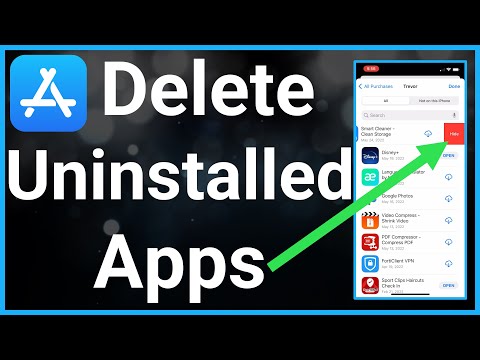
4. You will see two tabs: "All" and "Not on this iPhone." To find apps you have already uninstalled, select Not on this iPhone.
5. Locate the specific application you wish to remove from view.
6. Swipe left across the app title and tap the red Hide button that appears.
Managing Hidden Purchases via Desktop

If you are managing a large volume of legacy data, using a desktop interface is often more efficient for automation and bulk handling. Open Music (on Mac) or iTunes (on Windows), navigate to your Account Settings, and find the "Hidden Purchases" section. From here, you can manage the visibility of your entire software library with greater precision.
AI Implementation Score
At Smart AI Fix, we evaluate digital maintenance tasks based on their impact on system efficiency and the potential for algorithmic optimization.
| Criteria | Score (1-10) | Notes |
|---|---|---|
| Ease of Execution | 9/10 | Requires minimal manual input via native UI. |
| Data Hygiene Impact | 8/10 | Essential for cleaning recommendation engine inputs. |
| Automation Potential | 2/10 | Currently lacks a public API for bulk "hiding" via AI scripts. |
| Security Benefit | 6/10 | Reduces visibility of sensitive past app usage. |
Why This Matters for AI Personalization

Modern operating systems use machine learning models to suggest apps based on your historical usage and download patterns. By hiding uninstalled apps that are no longer relevant to your professional or personal life, you provide "cleaner" data to these algorithms. This results in more accurate "Siri Suggestions" and a more personalized App Store experience, effectively automating the discovery of tools that actually matter to your current tech stack.
