
Method 1: The Direct Message Forwarding Protocol

The most reliable way to transfer a specific text thread to an email address is through the native Message Forwarding feature. This method preserves the text content exactly as it was received.
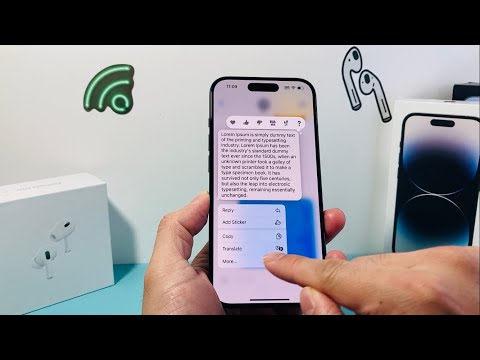
1. Open the Messages app and navigate to the desired conversation.
2. Long-press on the specific message bubble you wish to export.
3. Tap More... from the context menu. You will notice checkboxes appear next to all messages in the thread.
4. Select all relevant messages by tapping the circles on the left.
5. Tap the Share icon (the curved arrow) in the bottom right corner.
6. In the "To:" field of the new message draft, type your email address instead of a phone number.
7. Press Send. The iPhone will automatically route this through your cellular carrier's SMS gateway or as an iMessage data packet to the destination inbox.
Method 2: Leveraging AI via Live Text and OCR

For users who need to extract data from a conversation—such as code snippets, addresses, or dates—using Apple's Visual Intelligence (Live Text) is the superior choice for efficiency. This minimizes the friction of manual selection.
1. Take a screenshot of the text message thread.
2. Open the screenshot in the Photos app.
3. Tap the Live Text icon (the small square scanning symbol) in the bottom right.
4. Select Copy All or highlight specific technical data.
5. Switch to your Mail app, start a new draft, and Paste the content. This method allows you to use AI to recognize and format text before it is even sent.
Method 3: Automation via Apple Shortcuts

For high-frequency users, creating a Shortcuts automation can streamline this process. By setting up a "Share Sheet" shortcut, you can pass text directly from the clipboard to a pre-defined email template, reducing the number of taps required for data migration.
AI Implementation Score
To help you decide which workflow suits your technical needs, we have rated these methods based on Smart AI Fix efficiency metrics:
| Method | Efficiency Score | Automation Level | Best For |
|---|---|---|---|
| Manual Forwarding | 6/10 | Low | Single messages |
| Live Text OCR | 8/10 | Medium (AI-assisted) | Extracting specific data |
| Apple Shortcuts | 9/10 | High | Workflow professionals |
By utilizing these techniques, you transform a siloed text conversation into a searchable, archivable email asset. This integration is essential for maintaining a unified digital workspace where communication and automation intersect.
