
Optimizing the user interface (UI) of a wearable device is critical for maintaining peak productivity and ensuring that software automation remains accessible. For Apple Watch users, the legibility of notifications and system data is paramount. Adjusting the text size—or dynamic type—is a core software configuration that enhances the ergonomic interaction between the user and the watchOS ecosystem.
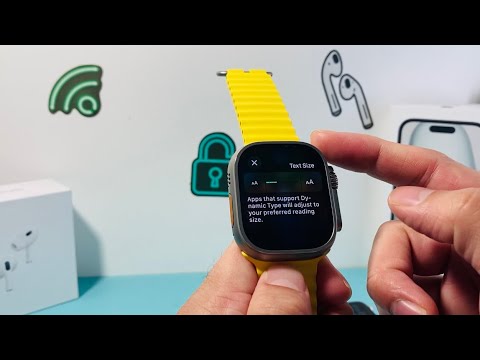
Method 1: Adjusting Text Size Directly on the Apple Watch

To modify the font scaling directly on the device, follow these precise technical steps. This method utilizes the Digital Crown for fine-tuned adjustments:
1. Press the Digital Crown to view your app grid or list and select the Settings app (gear icon).
2. Scroll down using the crown or your finger and tap on Display & Brightness.
3. Locate and tap on Text Size.
4. Rotate the Digital Crown or tap the letters on either side of the slider to increase or decrease the font dimensions. The UI will provide a real-time preview of the scaling.
5. To further enhance legibility, you can toggle the Bold Text switch located just below the Text Size menu. Note that enabling Bold Text requires a quick software restart of the Apple Watch to apply the new rendering parameters.
Method 2: Configuring Text via the iPhone Watch App
For those who prefer managing their device ecosystem through a larger interface, the iOS Watch App offers a centralized way to push configuration changes to the wearable hardware:
1. Open the Watch app on your paired iPhone.
2. Ensure you are on the My Watch tab.
3. Navigate to Display & Brightness.
4. Drag the Text Size slider to your preferred setting. The changes are synchronized instantly via Bluetooth or Wi-Fi to the Apple Watch.
5. If the standard maximum size is insufficient, you can navigate to Accessibility > Larger Text and toggle Larger Accessibility Sizes. This unlocks significantly higher scaling factors for users with specific visual requirements.
AI Implementation Score
In the context of software efficiency and automated UI scaling, we rate this feature based on its integration and performance within the Apple ecosystem:
| Metric | Score (1-10) | Notes |
|---|---|---|
| Software Optimization | 9.5 | watchOS uses Dynamic Type to wrap text without breaking the UI layout. |
| Sync Efficiency | 9.0 | Near-instantaneous synchronization between iPhone and Watch. |
| Accessibility Logic | 10.0 | Industry-leading font scaling and high-contrast bolding options. |
By effectively managing these settings, users ensure that their wearable remains a high-performance tool for data consumption, reducing eye strain and improving the speed of information processing.
