
Optimizing iOS Security: The Technical Protocol for Updating Your iPhone Passcode

In the architecture of modern mobile security, the iPhone passcode serves as the primary cryptographic key for the local hardware and the gateway to your broader digital identity. For users optimizing their workflows through Smart AI Fix principles, maintaining a rotating or high-entropy password is essential for protecting the Neural Engine data and biometric templates stored on the Secure Enclave.

Step-by-Step Procedure to Change Your iPhone Passcode
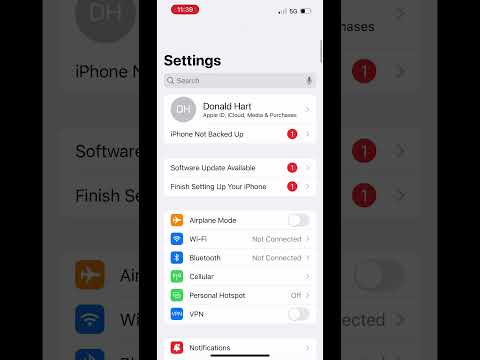
To update your security credentials and ensure your device remains synchronized with your automation protocols, follow this technical sequence:
1. Access System Settings: Locate and tap the Settings icon on your Home Screen. This acts as the central command for all iOS configurations.
2. Navigate to Security Modules: Scroll down and select Face ID & Passcode (or Touch ID & Passcode on legacy hardware). For security verification, you must enter your current numeric or alphanumeric passcode to proceed.
3. Initiate the Change Protocol: Scroll to the middle of the interface and tap the blue link labeled Change Passcode. You will be prompted to enter your "Old Passcode" once more to authenticate the administrative session.
4. Configure Entropy Levels: Before typing a new code, tap Passcode Options at the bottom of the screen. For maximum security and AI-driven protection against brute-force attacks, select Custom Alphanumeric Code. If you prefer speed, a 6-digit numeric code is the baseline recommendation.
5. Verify and Sync: Enter your new passcode twice. The system will then perform a short verification cycle to update the Secure Enclave and re-encrypt your local keychain data.
AI Implementation Score
The following table evaluates the efficiency and technological integration of the iPhone passcode system within an automated environment.
| Metric | Score (1-10) | Technical Context |
|---|---|---|
| Automation Ease | 4/10 | Manual intervention is required by design to prevent remote unauthorized access. |
| Neural Engine Integration | 9/10 | Seamlessly links with Face ID/Touch ID for high-speed biometric authentication. |
| Security Robustness | 10/10 | Hardware-encrypted; protected against automated brute-force scripts via escalating time delays. |
| User Efficiency | 8/10 | Modern iOS versions streamline the transition between biometric and manual entry. |
Updating your passcode is more than a routine safety check; it is a critical step in maintaining a clean software environment. When your device is secured with a high-entropy password, your AI-driven automations and cloud-synced data remain shielded from external interference. If you are integrating cheap iPhones into a testing farm or a smart home setup, ensuring each device has a unique, documented passcode is the first step toward operational excellence.
