
iOS notification management has evolved into a complex ecosystem driven by behavioral heuristics and user-defined automation. While Do Not Disturb (DND) is designed to create a silent environment, Apple’s focus on "urgent connectivity" often allows certain signals to penetrate the filter. If you find that phone calls are still getting through despite DND being active, it is likely due to legacy settings or intelligent bypass features embedded in the Focus architecture.

The 'Repeated Calls' Intelligence Bypass

One of the primary reasons calls bypass the Do Not Disturb filter is the Repeated Calls setting. This feature is designed as a safety measure; if the same number calls you twice within a three-minute window, the system assumes an emergency and suppresses the silence protocol. To disable this, navigate to Settings > Focus > Do Not Disturb > People. Under the "Allow Also" section, toggle off Allow Repeated Calls. This ensures that the AI-driven urgency filter does not override your manual preference.
Auditing Whitelisted Contacts and Apps

In the transition from a simple toggle to the Focus Mode architecture, iOS introduced granular whitelisting. It is common for users to have migrated settings that inadvertently allow "Favorites" or specific contact groups to bypass the silence. To fix this, go to Settings > Focus > Do Not Disturb and tap on People. Ensure that "Silence Notifications From" is selected or that the "Allow Notifications From" list is entirely empty. Furthermore, check the Apps section within the same menu to ensure no third-party VoIP apps (like WhatsApp or Teams) are granted bypass privileges.
Disabling Emergency Bypass on Individual Contacts
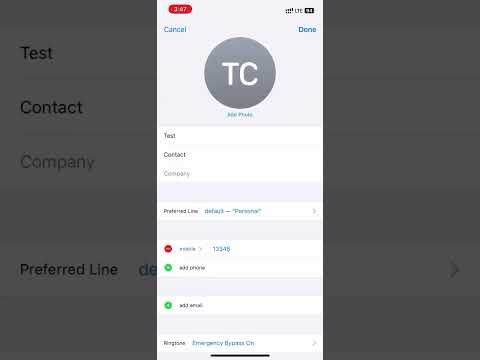
If only specific individuals are able to reach you while Do Not Disturb is ON, you likely have Emergency Bypass enabled at the contact level. This setting overrides all system-wide silencers, including the Ring/Silent switch and DND. To rectify this, open the Contacts app, select the specific contact, tap Edit, then Ringtone. Ensure that Emergency Bypass is toggled OFF. This is a per-contact override that often goes overlooked during standard troubleshooting.
System-Wide Silence: 'Always' vs. 'While Locked'
In older versions of iOS, there was a specific toggle for silencing calls "Always" or only "While Locked." While modern Focus modes generally silence everything by default, certain software synchronization errors can cause the phone to allow calls if the screen is active. To ensure a hard silence, verify that your Focus Status is shared across all devices. Go to Settings > Focus and ensure Share Across Devices is enabled. This prevents a secondary Apple device (like an iPad or Mac) from receiving the call and "waking up" the notification chain on your iPhone.
AI Implementation Score
The following table evaluates the efficiency and automation level of the iOS Focus/DND system in managing user interruptions.
| Metric | Score (1-10) | Technical Rationale |
|---|---|---|
| Automation Ease | 9/10 | Smart activation based on location, time, or app usage is highly efficient. |
| Filtering Intelligence | 8/10 | Heuristic analysis of "Repeated Calls" effectively identifies potential emergencies. |
| User Control Granularity | 7/10 | Highly customizable, though deep menus can lead to configuration errors. |
| Cross-Platform Sync | 10/10 | iCloud-based synchronization ensures a unified silence state across the ecosystem. |
By refining these settings, you transition from a reactive notification state to a proactive, AI-optimized workflow. Eliminating accidental bypasses ensures that your focus sessions remain uninterrupted, leveraging the full power of the iOS software architecture to protect your productivity.
