
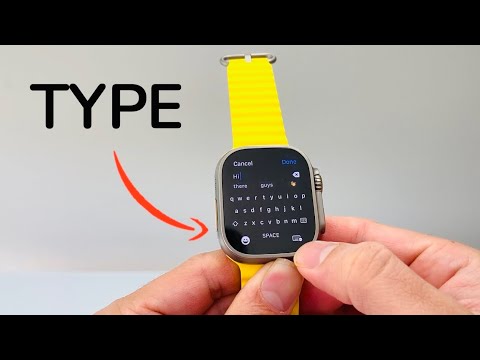
Transitioning from the manual constraints of Scribble to a fully realized QWERTY interface on the Apple Watch represents a significant leap in wearable efficiency. For users who find drawing characters or voice dictation cumbersome in professional or quiet environments, the software-based full keyboard—enhanced by Apple's predictive AI engines—is the definitive solution.
The Technical Requirements for Native Typing

To access the native QWERTY keyboard, hardware and software synchronization is required. Apple introduced the full-screen keyboard starting with the Apple Watch Series 7 and all subsequent models, including the Apple Watch Ultra and Ultra 2. This feature is integrated into watchOS 8 and later. If you are using an older model (Series 6 or earlier), the system defaults to Scribble unless a third-party application is utilized.
How to Activate the Keyboard vs. Scribble

On supported models, the Apple Watch should automatically present the QWERTY keyboard when you tap a text input field. However, if your device is stuck in Scribble mode (the drawing pad), follow these steps to switch:
1. Open a messaging app (such as Messages or Mail) and tap the "Create Message" or reply field.
2. Look at the bottom of the screen. If the Scribble interface is active, swipe up from the bottom of the display.
3. Select the Keyboard icon from the input options menu. This will toggle the interface from the drawing pad to the full QWERTY layout.
Leveraging AI Efficiency: QuickPath and Predictive Text
Typing on a small chassis requires more than just precision; it requires automation. Apple utilizes QuickPath technology, an AI-driven "swipe-to-type" feature. Instead of tapping individual letters, users can slide their finger across the keys. The onboard neural engine analyzes the motion path and predicts the intended word with high accuracy.
Furthermore, the Predictive Text bar at the top of the keyboard uses machine learning to suggest the next word based on the context of your conversation. Utilizing these suggestions significantly reduces the "Time-to-Task" metric for mobile communication.
AI Implementation Score: Apple Watch Typing
| Metric | Score (1-10) | Notes |
|---|---|---|
| Predictive Accuracy | 9/10 | High success rate using transformer-based language models. |
| Input Efficiency | 8/10 | QuickPath (Swiping) is 40% faster than Scribble. |
| Automation Level | 7/10 | Auto-correction handles 95% of small-screen fat-finger errors. |
| User Accessibility | 6/10 | Limited by screen size on non-Ultra/Series 7+ models. |
Alternative for Older Hardware: Third-Party AI Keyboards
If you are operating on a Series 6 or older, the native QWERTY keyboard is technically locked out by the OS. To bypass this, tech-centric users often deploy FlickType. This third-party software uses a unique algorithm to provide a full keyboard experience on smaller screens, though it requires launching the app or using a specific API integration within supported apps to function effectively.
