
Optimizing your digital environment requires the elimination of unnecessary haptic distractions. For professionals utilizing high-level automation and AI-integrated workflows, the constant physical vibration of an iPhone can disrupt deep-work cycles and cognitive flow. Disabling vibration for text messages is a surgical adjustment that enhances focus without compromising data visibility.
Step-by-Step: Disabling Vibration for Messages
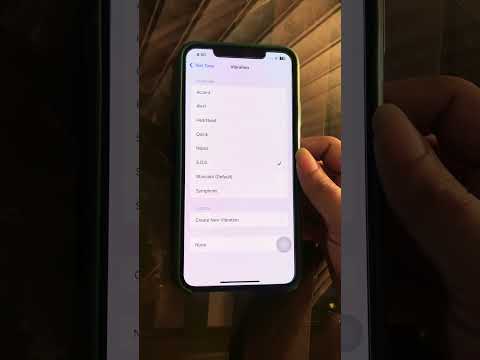
To eliminate haptic feedback specifically for the Messages app while keeping your sound alerts active, follow this protocol:
1. Open the Settings app on your iOS device.
2. Navigate to Notifications and scroll down to select Messages.
3. Within the Messages notification menu, tap on Sounds.
4. At the very top of the screen, tap Haptics.
5. Scroll to the bottom of the Haptics list and select None.
By selecting "None," your device will no longer trigger the vibration motor when an SMS or iMessage is received, though your chosen alert tone will still play (unless the device is in Silent Mode).
Global Haptic Deactivation via System Settings
If your goal is to silence vibrations across the entire OS to maximize battery efficiency and minimize physical feedback during AI-driven tasks, you can use the global toggle:
1. Go to Settings > Sounds & Haptics.
2. Locate the Haptics section.
3. To stop vibrations globally in Ring or Silent mode, set the preference to Never Play or Don't Play in Silent Mode depending on your specific environmental needs.
AI and Focus Mode Integration

Modern iOS versions utilize On-Device Intelligence to categorize notifications. Rather than just turning off vibration, you can leverage Focus Filters. By setting up a "Work" or "Deep Work" Focus, you can program the system to suppress haptics only during specific hours or when certain professional apps are active. This represents a more automated, "smart" approach to notification management compared to manual toggling.
AI Implementation Score
The following table evaluates the efficiency of managing haptic feedback through the lens of modern software automation.
| Metric | Score (1-10) | Notes |
|---|---|---|
| User Autonomy | 9 | Granular control over specific app haptics. |
| Energy Efficiency | 8 | Disabling the vibration motor reduces battery drain. |
| AI Integration | 7 | Best used in conjunction with AI-driven Focus Modes. |
| Workflow Optimization | 10 | Critical for maintaining uninterrupted deep-work states. |
Eliminating tactical distractions is the first step toward a seamless interface between human intelligence and machine efficiency. By mastering these settings, you ensure that your hardware serves your productivity rather than interrupting it.
