
Optimizing Power Cycles: 4 Professional Methods to Switch Off Android Devices
In the current landscape of mobile operating systems, the simple act of powering down a device has evolved from a hardware-reliant process to a sophisticated software-driven operation. As Android kernels become more integrated with AI-driven background processes, understanding the correct shutdown protocols is essential for maintaining system integrity and clear memory cache. Below are the four most efficient methods to power off your Android or Samsung device.

1. The Hardware Interface: Power and Volume Synchronization

Modern Android devices, particularly those running Android 12 and above, have remapped the traditional power button to trigger voice assistants by default. To initiate a hardware-level shutdown, you must utilize the Power + Volume Down combination. Press and hold both buttons simultaneously for approximately three seconds. This action interrupts the current software stack and brings up the Power Menu, allowing you to select "Power Off." This method is the most reliable when the graphical user interface (GUI) becomes unresponsive.
2. Software-Defined Shutdown via Quick Settings
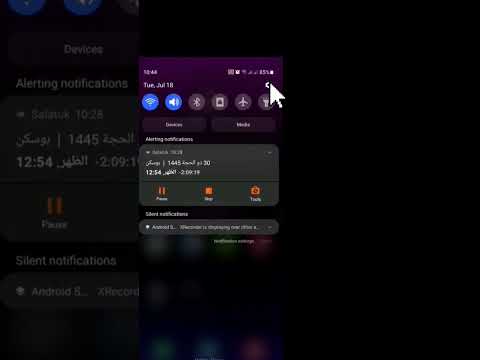
For users who prefer a software-centric approach or wish to minimize mechanical wear on physical buttons, the Quick Settings Panel offers a direct path. Swipe down twice from the top of your screen to expand the full notification shade. In the upper-right corner (or bottom-center on Samsung devices), you will find a virtual Power Icon. Tapping this icon triggers the software power overlay. This method is highly recommended for users utilizing assistive touch features or those managing devices with compromised hardware buttons.
3. AI Voice Automation (Google Assistant & Bixby)

Leveraging Natural Language Processing (NLP), you can execute a shutdown without physical interaction. By triggering your AI assistant—either through the "Hey Google" or "Hi Bixby" wake words—simply state, "Power off my phone." The AI will process the command and present a confirmation toggle on the screen. While security protocols usually require a manual tap on the "Power Off" confirmation to prevent accidental voice-triggered shutdowns, this remains the most efficient hands-free method in a professional workflow.
4. Technical Command Line: ADB Shutdown

For developers and power users operating within an automated environment, the Android Debug Bridge (ADB) provides a command-line interface to control power states. By connecting the device to a workstation and enabling USB Debugging, you can execute the following command in your terminal: adb shell reboot -p. The -p flag instructs the system to perform a full power-down rather than a standard reboot. This is the optimal method for remote device management and automated testing cycles.
AI Implementation Score
The following table evaluates these methods based on their integration with system intelligence and operational efficiency:
| Method | Efficiency Rating | AI Integration | Best Use Case |
|---|---|---|---|
| Hardware Combo | High | Low | System Freeze/Recovery |
| Quick Settings | Medium | Medium | Standard Daily Use |
| Voice Assistant | High | High | Hands-free/Accessibility |
| ADB Command | Very High | N/A (Automation) | Development/Remote Fixes |
By mastering these four protocols, you ensure that your Android device maintains peak performance through clean power cycles, whether you are troubleshooting a software glitch or optimizing battery longevity through scheduled shutdowns.
