
In the era of hyper-connected software and AI-driven data harvesting, maintaining network integrity on mobile devices is no longer optional. Android's Private DNS (DNS over TLS) feature provides a streamlined, system-wide method to intercept tracker requests before they reach the application layer. This optimization not only secures your data but also improves the efficiency of local automation scripts and AI models by reducing unnecessary background network traffic.
The Technical Architecture of Private DNS

Unlike standard DNS queries that are sent in plaintext, Private DNS utilizes the DNS over TLS (DoT) protocol. By configuring a specific provider, your Android device encrypts all outgoing queries. When using a filtering provider like AdGuard or NextDNS, the server compares the request against a real-time blacklist of known trackers and telemetry endpoints. If a match is found, the connection is dropped, preventing the tracker from executing its payload.
Step-by-Step: Setting Up Private DNS on Stock Android
For users on Pixel devices or those running a near-stock version of Android 9.0 or higher, follow these steps to automate tracker blocking:
1. Open the Settings app and navigate to Network & Internet.
2. Tap on Private DNS (located under "Advanced" in some versions).
3. Select the Private DNS provider hostname option.
4. Enter a filtering hostname. For a balance of efficiency and security, use: dns.adguard.com or your custom NextDNS endpoint.
5. Tap Save. Your device will now route all queries through the encrypted, filtered tunnel.
Configuration for Samsung (One UI) Devices

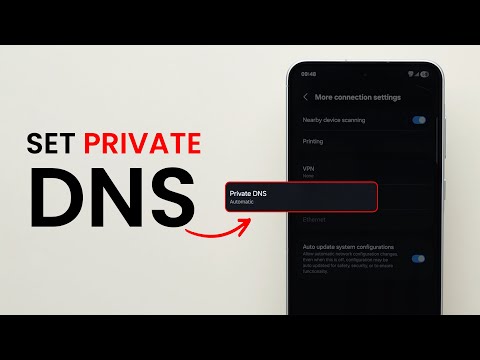
Samsung’s One UI places these settings in a slightly different directory within the software stack. To optimize your Samsung Galaxy device:
1. Navigate to Settings and select Connections.
2. Scroll down and tap More connection settings.
3. Locate Private DNS.
4. Toggle the radio button to Private DNS provider hostname.
5. Input your preferred DNS provider (e.g., dns.adguard-dns.com) and confirm.
Optimizing for AI and Automation Workflows
By implementing Private DNS, you reduce the "noise" within your device's log files. For developers using AI diagnostic tools or automation software like Tasker, this filtering ensures that your data processing power is spent on legitimate application logic rather than processing telemetry packets from third-party advertising SDKs. This results in lower latency and improved battery longevity.
AI Implementation Score
The following table evaluates the impact of Private DNS on system performance and security from an AI-centric perspective.
| Metric | Score (1-10) | Technical Rationale |
|---|---|---|
| Complexity | 2 | Minimal configuration required; no root access needed. |
| Data Privacy | 9 | Encrypted DoT prevents ISP snooping and man-in-the-middle attacks. |
| Efficiency Gain | 8 | Reduces bandwidth waste by blocking non-essential tracker pings. |
| AI Compatibility | 10 | Clean network logs allow for more accurate AI traffic analysis. |
Implementing Private DNS is the most efficient, "set-and-forget" method to harden your Android ecosystem against pervasive tracking. By managing your DNS at the system level, you eliminate the need for secondary VPN-based ad-blockers, freeing up the VPN slot for other security automation tools.
