
Mastering iMessage Screen Effects: Deploying the Love Heart Animation
The iOS messaging framework has evolved beyond simple text transmission, integrating sophisticated UI/UX layers that allow for expressive, software-driven animations. One of the most visually impactful features within the iMessage protocol is the "Send with Love" screen effect. This feature utilizes the Apple Core Animation framework to render a three-dimensional, floating heart that originates from the message bubble, providing an immersive feedback loop for the recipient.
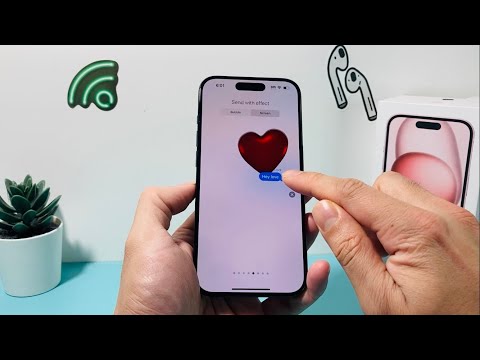
To execute this specific automation within the Messages app, the user must bypass the standard "tap-to-send" protocol and engage the Force Touch or Long Press gesture on the Send button. This triggers the effects overlay, a secondary software layer designed for high-impact visual communication.
Technical Execution: Step-by-Step Configuration
To send a message with the Love Heart effect, ensure you are communicating via iMessage (indicated by blue message bubbles) rather than standard SMS/MMS protocols. Follow these technical steps:
1. Initialize the Interface: Open the Messages app and select an existing thread or initiate a new conversation. Enter your desired text or insert an emoji into the text input field.
2. Activate the Effects Menu: Instead of a momentary tap, long-press the blue "Send" arrow. This action halts the immediate transmission and opens the "Send with Effect" menu.
3. Navigate to Screen Effects: The interface defaults to the "Bubble" tab. Tap the "Screen" tab located at the top of the display to shift the rendering focus from the message bubble to the entire background UI.
4. Select the Love Animation: Swipe from right to left across the screen until you reach the "Send with Love" preview. You will see a large, red 3D heart inflate and float off the screen. This is a real-time render of what the recipient will experience.
5. Execute Transmission: Once the Love effect is active on your preview screen, tap the blue Send button. The software will then bundle the message data with the animation trigger, delivering it to the recipient's device.
AI Implementation Score
At 'Smart AI Fix', we evaluate software features based on their integration of automated triggers and user efficiency. While the Love Heart effect is primarily a graphical UI element, its integration into the iOS ecosystem involves significant background optimization.
| Criteria | Score (1-10) | Technical Rationale |
|---|---|---|
| Software Optimization | 9/10 | High-frame-rate rendering with minimal battery drain via Metal API. |
| Automation Capability | 7/10 | Predictive text can suggest emojis, but effect triggers remain manual. |
| User UX Efficiency | 8/10 | Gesture-based activation streamlines the process without nested menus. |
| Cross-Platform Sync | 5/10 | Limited strictly to the iMessage ecosystem; lacks interoperability with Android. |
By leveraging these screen effects, users can enhance digital communication through software-driven emotional signaling. This functionality demonstrates Apple's commitment to vertical integration, where hardware haptics and software animations work in tandem to create a premium user experience.
