
Optimizing Localized Intelligence: Resetting Location and Privacy Settings on iOS
In the ecosystem of localized AI and predictive software, the integrity of your iPhone’s location and privacy data is paramount. Over time, granular permissions granted to various applications can lead to "permission bloat," potentially degrading the efficiency of your device's On-Device Machine Learning models. By resetting these parameters, you recalibrate how iOS interacts with geospatial data and third-party APIs, ensuring a clean slate for your automation workflows and privacy-centric algorithms.
The Technical Procedure for Resetting Location & Privacy
Performing a reset of these settings does not delete your personal data, photos, or contacts. Instead, it flushes the current database of app permissions and restores the system-level defaults for Location Services and Privacy prompts. Follow these steps for a precise execution:
1. Navigate to the Settings application on your iPhone.
2. Scroll down and tap on General.
3. Proceed to the bottom of the menu and select Transfer or Reset iPhone.
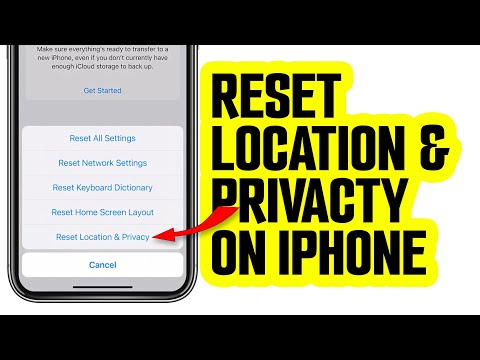
4. Tap the Reset button to reveal the sub-menu of specialized reset options.
5. Select Reset Location & Privacy.
6. Input your Device Passcode when prompted to authenticate the request.
7. Confirm the action by tapping Reset Settings.
Once triggered, all applications that previously had access to your camera, microphone, and GPS will be required to request permission again via the standard iOS modal dialogs upon their next launch.
Why Algorithmic Hygiene Requires Regular Privacy Resets

For users leveraging Smart AI Fix methodologies, maintaining "algorithmic hygiene" is critical. When apps accumulate excessive background location data, it can lead to inefficient battery management and distorted behavioral profiles. By resetting these settings, you force the iOS kernel to re-evaluate which processes are essential for your current automation needs, effectively pruning dead-end data links that no longer serve your productivity goals.
AI Implementation Score
The following table evaluates the impact of resetting Location and Privacy settings through the lens of technical optimization and AI efficiency.
| Metric | Score (1-10) | Impact Description |
|---|---|---|
| Execution Speed | 9/10 | The process takes less than 60 seconds to complete system-wide. |
| Privacy Enhancement | 10/10 | Immediately revokes all unauthorized or forgotten third-party data access. |
| AI Model Recalibration | 8/10 | Forces local ML models to relearn user preferences from a clean baseline. |
| Automation Stability | 7/10 | Clears conflicting permission flags that can break complex Shortcuts or Geofences. |
In conclusion, a Reset of Location & Privacy settings is more than a troubleshooting step; it is a strategic maneuver for anyone looking to maximize the computational efficiency and security of their mobile environment. By re-verifying every data request, you maintain total control over your digital footprint and the AI-driven insights generated by your hardware.
