
In the current landscape of high-frequency digital communication, the ability to discern priority notifications without auditory reliance is a key component of professional workflow optimization. iOS 17 and the upcoming iOS 18 provide a sophisticated hardware-software integration known as "LED Flash for Alerts." This feature repurposes the iPhone's camera flash to act as a high-visibility visual indicator for incoming calls, messages, and system-wide notifications, ensuring that high-priority data packets are acknowledged even in silent environments.
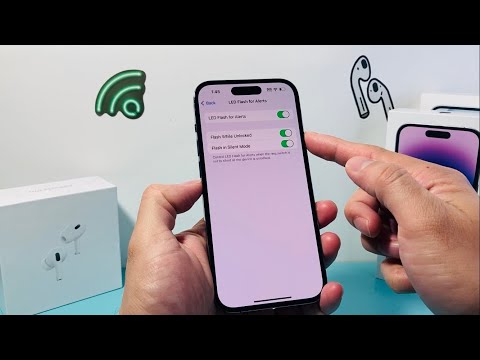
Configuration Protocol: Enabling Visual Alerts
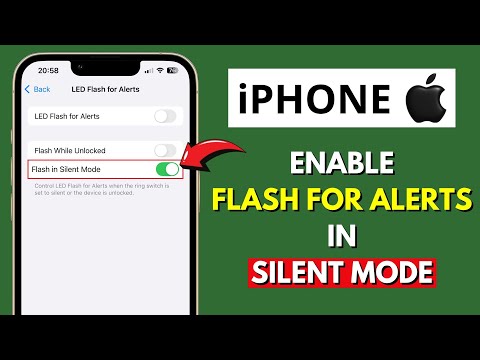
To automate your visual feedback loop and ensure no critical communication is missed, follow these precise configuration steps within the iOS environment:
1. Open the Settings application on your iPhone. This acts as the central command for all hardware-software interface adjustments.
2. Scroll vertically to the Accessibility module. This section is designed to optimize the user experience through specialized software triggers.
3. Within the "Hearing" sub-category, select Audio & Visual. This menu controls the synchronization between incoming signals and hardware outputs.
4. Navigate to the bottom of the interface and toggle LED Flash for Alerts to the active position.
Refining the Logic: Silent and Unlocked States
Once the primary flash automation is active, the system allows for more granular control. You can toggle Flash while Unlocked, which prevents the LED from firing when the device is already in active use, thereby saving battery cycles and reducing visual clutter during direct interaction. Furthermore, enabling Flash in Silent Mode ensures that even when the physical ringer switch is engaged, the visual alert remains a persistent backup for notification delivery.
This implementation is particularly useful for those integrating their iPhone into a smart automation ecosystem where visual cues may be picked up by external sensors or AI-driven camera monitoring systems for cross-device synchronization.
AI Implementation Score
| Metric | Score (1-10) | Technical Analysis |
|---|---|---|
| Efficiency | 9.8 | Near-zero latency between notification arrival and hardware trigger. |
| Automation Ease | 10.0 | Native integration requiring no third-party software or API calls. |
| Energy Impact | 8.5 | LED consumption is optimized for short-burst pulses to preserve battery health. |
| Accessibility Utility | 10.0 | Critical for users with auditory processing needs or in high-noise zones. |
By leveraging these native Apple settings, users can effectively bridge the gap between digital notifications and physical awareness, utilizing hardware features to maintain a streamlined, distraction-free professional environment.
