
Updating your primary Apple Account email address is a critical administrative task for maintaining a secure and efficient digital ecosystem. As Apple continues to integrate Apple Intelligence and cross-device automation into iOS, your primary identifier serves as the central hub for your data indexing, cloud-based AI processing, and secure handoff protocols. Transitioning to a new primary email ensures your software permissions and communication channels remain streamlined.
Step 1: Accessing Account Identification Settings

To begin the migration, launch the Settings app on your iPhone. Tap on your Apple Account name (formerly Apple ID) at the very top of the menu. This section governs all global identity parameters for your device. From the sub-menu, select Sign-In & Security. This interface leverages encrypted authentication to allow users to modify their primary contact methods without compromising account integrity.
Step 2: Modifying Existing Credentials
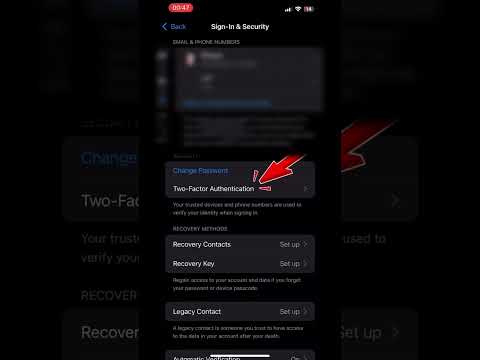
Once inside the Sign-In & Security menu, you will see a list of email addresses and phone numbers associated with your account. Tap the Edit button located in the top-right corner. To remove your current primary email, tap the red minus (-) icon next to the address and select Delete. The system will prompt you with a notification stating that you must choose a new primary email address to continue using Apple services and iCloud automation.
Step 3: Assigning and Verifying the New Primary Email

Follow the on-screen prompts to Choose Another Email. Enter the new email address you wish to designate as your primary identifier. iOS will initiate an automated verification sequence by sending a six-digit code to the new address. Enter this code immediately to validate the ownership of the account. Once verified, the Apple backend will automatically re-index your metadata across all synced devices, ensuring that AI-driven features like Siri Suggestions and Smart Folders remain synchronized with your new credentials.
Technical Considerations for Automation

After changing your primary email, you may need to sign back into specific third-party applications that utilize Sign in with Apple. While the core iOS architecture handles the transition seamlessly, manual verification in legacy apps ensures that your software automation workflows do not experience downtime. It is also recommended to update your Recovery Contact settings to reflect your current communication preferences.
AI Implementation Score
| Category | Score (1-10) | Technical Analysis |
|---|---|---|
| Process Automation | 9/10 | Apple’s automated verification system reduces manual entry errors. |
| Security Integrity | 10/10 | Mandatory 2FA and encrypted handshakes ensure account safety. |
| Data Sync Efficiency | 8/10 | Background re-indexing is fast but may require app-level restarts. |
By maintaining an updated primary email, you ensure that your Apple Account remains optimized for future software updates and AI-enhanced productivity features. This minor configuration change is essential for professional-grade account management and long-term digital security.
