
To deactivate Focus Mode on an iPhone, the most efficient path is through the Control Center. This interface allows for immediate manual override of any active profiles—such as Do Not Disturb, Work, or Sleep—that may be filtering your incoming notifications and signals. Swipe down from the top-right corner of the screen (or swipe up from the bottom on older models with a Home button) to reveal the Control Center. Locate the Focus toggle, which will display the name of the currently active mode. Tap the icon once to toggle it Off. When the background of the button turns transparent, the device has returned to its standard notification state.

Disabling Focus Mode via System Settings
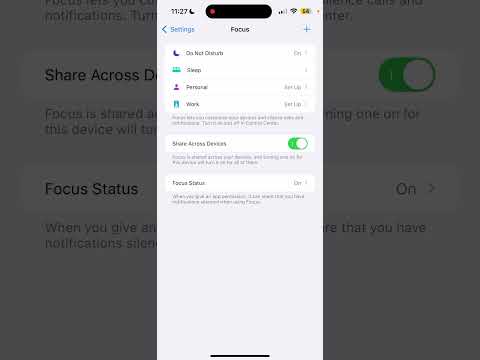
For users who require more granular control or need to troubleshoot a Focus mode that persistently reactivates, the Settings menu provides the necessary depth. Navigate to Settings > Focus. Here, you will see a comprehensive list of your configured profiles. Selecting a specific mode, such as Do Not Disturb, allows you to inspect the trigger logic. If you wish to prevent a mode from ever activating automatically, ensure that any Schedules or Smart Activations listed under the "Set A Schedule" section are toggled to Off or deleted entirely.
Managing AI-Driven "Smart Activation"

Apple’s ecosystem utilizes on-device machine learning to predict when a user needs to minimize distractions. This feature, known as Smart Activation, monitors location data, app usage patterns, and historical behavior to toggle Focus modes without manual input. While this enhances AI efficiency, it can occasionally conflict with real-time communication needs. To turn this off, go to the specific Focus profile in Settings and disable the Smart Activation toggle. This returns full manual sovereignty to the user, ensuring the software does not prioritize automated silence over urgent connectivity.
AI Implementation Score
In our technical evaluation at Smart AI Fix, we rate the iPhone Focus Mode feature based on its automation capabilities and user-end control.
| Metric | Score | Description |
|---|---|---|
| Ease of Use | 9.5/10 | Instant deactivation via Control Center is highly intuitive. |
| AI Automation | 8.5/10 | Smart Activation effectively learns user habits over time. |
| Customization | 9.0/10 | Granular filters for apps and people offer high precision. |
Global Focus Status Syncing

One technical detail often overlooked is the Share Across Devices functionality. Integrated via iCloud, turning on or off a Focus mode on your iPhone will, by default, trigger the same state on your iPad, Mac, and Apple Watch. If you wish to turn off Focus Mode on your iPhone while keeping it active on other hardware, navigate to Settings > Focus and toggle Share Across Devices to Off. This decouples the iPhone from the unified ecosystem state, allowing for localized notification management.
