
The Evolution of Passive Entry: Tesla’s BLE Architecture

Tesla’s phone key system represents the pinnacle of software-defined vehicle access. By leveraging Bluetooth Low Energy (BLE) and proprietary proximity algorithms, the vehicle transforms your smartphone into a high-security authentication token. Unlike traditional proximity fobs, the Tesla Phone Key utilizes a continuous encrypted handshake between the Tesla mobile app and the vehicle’s onboard computer to determine intent and distance with millimetric precision.
Requirements for 2024 Software Integration

Before initiating the setup, ensure your hardware environment meets the current standards for seamless automation. You must be running the Tesla App (version 4.30.0 or higher) and your smartphone must support Bluetooth 4.0 or above. Additionally, the vehicle requires a stable cellular or Wi-Fi connection to register the new security certificate during the initial pairing process.
Step-by-Step Configuration Protocol
1. Authorization: Open the Tesla app on your smartphone and select your vehicle. Locate the "Phone Key" status bar and tap "Set Up". This triggers the vehicle’s Bluetooth receiver to enter "Search" mode.
2. Permission Matrix: For the AI-driven proximity features to function, you must grant the Tesla app "Always" access to Location Services and ensure "Background App Refresh" is enabled. This allows the software to calculate your distance from the vehicle even when the phone is locked in your pocket.
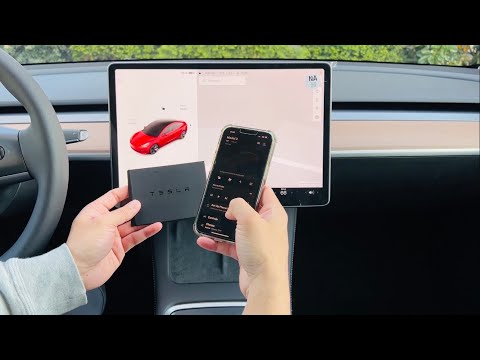
3. Hardware Authentication: Sit in the driver’s seat with your physical Key Card ready. When the app prompts you, place the Key Card on the center console (the RFID reader is typically located behind the cup holders on Model 3/Y or near the wireless charger on refreshed Model S/X). This physical touchpoint validates that the digital request is authorized by the vehicle owner.
4. Finalization: Once the app displays "Phone Key Active," the synchronization is complete. The vehicle has now stored your phone’s unique hardware ID as a trusted device.
AI Implementation Score
This table evaluates the technical efficiency and automation logic of the Tesla Phone Key system compared to industry standards.
| Metric | Score (1-10) | Technical Rationale |
|---|---|---|
| Automation Seamlessness | 9.5 | Zero-touch interaction; vehicle wakes based on approach velocity. |
| Security Architecture | 9.0 | Uses asymmetric cryptography to prevent relay-station attacks. |
| Software Stability | 8.5 | BLE polling is highly reliable, though dependent on OS battery optimization. |
| AI Efficiency | 8.0 | Predictive door-unlocking reduces latency between approach and entry. |
Optimizing the Digital Key for Peak Efficiency

To maximize the automation potential of your Tesla, navigate to the vehicle’s touchscreen and enable "Walk-Away Door Lock." This feature uses the drop-off in BLE signal strength to automatically secure the cabin as you move away. For users prioritizing security, 2024 firmware updates have introduced enhanced Ultra-Wideband (UWB) support for newer iPhone and Android models, which provides even more accurate spatial awareness and further mitigates the risk of signal skimming.
If you encounter latency issues, the primary cause is usually the smartphone’s Power Management settings. Ensure the Tesla app is "unmonitored" or "not optimized" in your battery settings to prevent the OS from killing the background process responsible for the BLE handshake.
