
Optimizing digital assets for storage efficiency and platform compatibility is a critical skill in the modern mobile ecosystem. For Android users, resizing a photo is no longer just about shrinking pixel dimensions; it is about leveraging computational photography and AI-driven interpolation to maintain visual integrity while reducing data footprints. Whether you are prepping an image for a specific web UI or clearing space on your device, the methodology depends on your required level of precision.
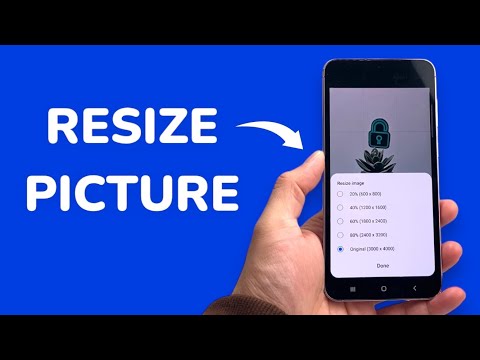
Method 1: Native Gallery Integration (Samsung and Pixel)
Modern Android distributions, particularly Samsung’s One UI and Google’s Pixel UI, have integrated basic resizing tools directly into the system gallery. These tools utilize on-device machine learning to ensure that when you downscale an image, the hardware minimizes aliasing artifacts.
To use this, open your image in the Gallery app, tap the Edit (pencil) icon, and navigate to the options menu (usually three dots). Select "Resize". Here, you can choose to reduce the image by a specific percentage (20%, 40%, 60%, or 80%). This is the most efficient path for users who need a quick reduction without installing third-party software.
Method 2: AI-Powered Third-Party Applications

For professional-grade resizing—especially when upscaling is required—standard interpolation often fails. Apps like Adobe Lightroom Mobile or Photo & Picture Resizer use advanced algorithms to reconstruct textures during the resizing process. Lightroom, specifically, utilizes Adobe Sensei AI to handle "Super Resolution" tasks, allowing you to increase or decrease dimensions while the software intelligently fills in pixel gaps to prevent blurriness.
If your goal is automation, apps like Batch Resizer allow you to apply specific DPI (Dots Per Inch) and pixel configurations to hundreds of images simultaneously. This is a vital workflow for developers and social media managers who must adhere to strict aspect ratio constraints across different platforms.
Method 3: Web-Based AI Automation
When local processing power is insufficient, or you require Neural Network-based upscaling, web-based tools such as TinyWow or ILoveIMG are the superior choice. These platforms use cloud-based AI to analyze the "semantics" of an image before resizing. For example, if you are resizing a portrait, the AI prioritizes edge detection around the subject to ensure the resize doesn't result in "mushy" skin textures.
AI Implementation Score
The following table evaluates the efficiency and technological depth of different resizing methods available on Android:
| Method | AI Efficiency | Automation Potential | Best Use Case |
|---|---|---|---|
| Native Gallery | Medium | Low | Single, quick adjustments. |
| Adobe Lightroom (Sensei) | High | Medium | Professional quality & upscaling. |
| Web AI Upscalers | Ultra-High | Medium | Recovering low-res assets. |
| Batch Processing Apps | Low | High | Bulk resizing for web dev. |
The Technical Edge: Compression vs. Resizing
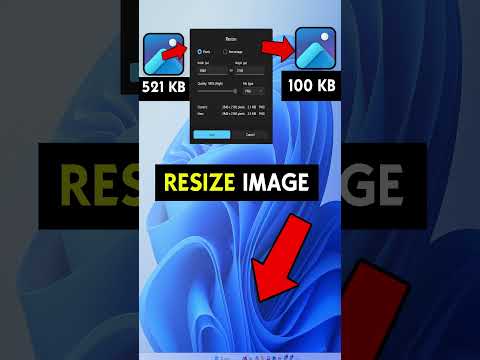
It is vital to distinguish between resizing (changing the physical pixel dimensions) and compression (reducing file size by discarding data). For maximum efficiency on Android, a "Smart AI Fix" involves resizing the image to the exact display dimensions needed (e.g., 1080px width for most web use) and then applying a WebP or HEIC compression algorithm. This dual-layer approach ensures that your Android device remains a high-performance workstation for digital content management.
