
Understanding Windows S Mode and the Need for Transformation

Windows S Mode is a restricted version of the Windows operating system designed specifically for security and performance by only allowing applications from the Microsoft Store. While this provides a "walled garden" environment suitable for basic tasks, it acts as a significant bottleneck for professionals focused on AI efficiency, custom software development, and advanced automation. To leverage third-party AI tools, local LLM environments, or Python-based automation scripts, disabling S Mode is a mandatory technical requirement.
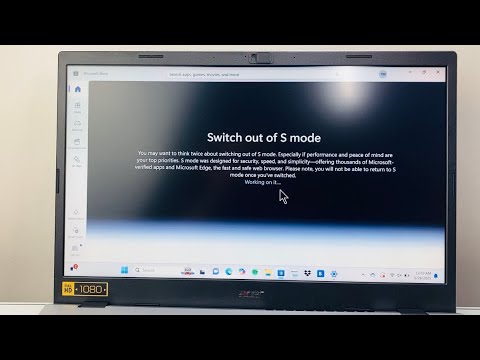
Step-by-Step Guide: Switching Out of S Mode

Disabling S Mode is a one-way transition. Once you switch to a standard Windows Home or Pro version, you cannot return to S Mode without a complete factory image reinstallation. Follow these steps to unlock your system's full potential:
1. Open Settings on your Windows PC by pressing the Win + I shortcut.
2. Navigate to System and then select the Activation tab on the left-hand side (or under "Update & Security" in older builds).
3. Locate the section labeled Switch to Windows 11 Home or Switch to Windows 11 Pro. Note: Do not click the "Go to the Store" link under the "Upgrade your edition of Windows" section; you must look specifically for the "Switch out of S mode" subsection.
4. Click the Go to the Store link. This will open a specific page in the Microsoft Store titled "Switch out of S mode."
5. Click the Get button. After a brief validation process, your system will instantly unlock. No restart is typically required, though a reboot is recommended to refresh system registry permissions.
Why AI Efficiency Demands This Change

For the modern power user, S Mode is an obstacle to automation. Most AI-driven productivity tools—such as specialized IDEs for machine learning, local GitHub repositories, and terminal-based automation frameworks—require the ability to execute .exe files and run scripts outside the Store's ecosystem. By disabling S Mode, you gain the ability to install Docker, VS Code, and Anaconda, which are foundational for any AI implementation strategy.
AI Implementation Score
The following table evaluates the impact of switching out of S Mode on your technical workflow efficiency.
| Metric | Score (1-10) | Description |
|---|---|---|
| Efficiency Boost | 9.5 | Unlocks the ability to run high-performance, non-Store automation tools. |
| Ease of Execution | 10.0 | A simple software-based toggle within the OS settings. |
| AI Compatibility | 10.0 | Essential for installing local Python environments and AI libraries. |
| Risk Factor | 2.0 | Slightly increases exposure to unverified third-party software. |
Troubleshooting Common Activation Errors
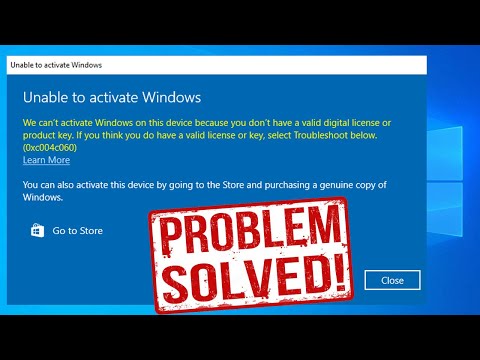
Occasionally, the Microsoft Store may display a "Try again later" error or a blank screen when attempting to switch. This is usually caused by pending Windows updates or a cached Store glitch. To resolve this, ensure all system updates are installed and clear the Store cache by running wsreset.exe in the "Run" dialog box. Once the cache is cleared, the "Switch out of S mode" page should function correctly, allowing for a seamless transition to a fully functional OS environment.
