
The Technical Rationale for Disabling RCS Messaging

While Rich Communication Services (RCS) is designed to elevate the traditional SMS experience with features like read receipts, high-resolution media sharing, and typing indicators, it can occasionally introduce friction into automated workflows. For power users and developers utilizing AI-driven SMS automation or cross-platform synchronization tools, the proprietary nature of RCS encryption can lead to message delivery failures or "stuck" outgoing packets when switching hardware. Disabling RCS ensures a fallback to the universal SMS/MMS protocol, which offers higher predictability for algorithmic sorting and third-party integrations.
Method 1: Disabling RCS via Google Messages (Standard Android)
If you are using the native Google Messages app—the primary vessel for RCS implementation on Pixel and modern Motorola devices—the deactivation process is managed within the internal application settings. This is the most common point of failure for users transitioning their SIM card to a device that does not support Google's Jibe Mobile servers.
1. Open the Messages app on your Android device.
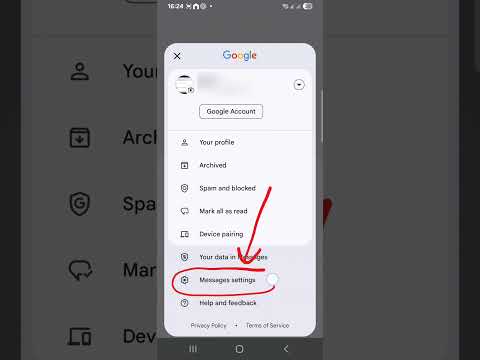
2. Tap your profile icon (or the three-dot menu) in the top right corner.
3. Select Message settings.
4. Locate and tap on RCS chats (in older versions, this may be labeled "Chat features").
5. Toggle the switch for Turn on RCS chats to the Off position.
6. Confirm the action in the pop-up dialog to successfully deregister your phone number from the RCS cloud.
Method 2: Configuring Samsung Messages
Samsung devices often ship with their own proprietary messaging client which handles RCS differently than the Google variant. If your device utilizes Samsung Messages, follow these steps to revert to standard cellular messaging.
1. Launch the Samsung Messages application.
2. Tap the three-dot menu icon located above your conversation list.
3. Navigate to Settings and then select Chat settings.
4. Tap on Rich Communications.
5. Toggle the switch to Off. Note that on some carrier-branded versions, this may be labeled as "Default messaging type" where you should select "Text or multimedia messages."
Method 3: Remote De-registration (For Inaccessible Devices)
In scenarios where the original Android device is lost, damaged, or already wiped, the AI synchronization between your phone number and the RCS server may persist, causing incoming messages to disappear. Google provides a web-based portal to force a remote de-registration.
1. Access the official Google RCS Deactivation web portal.
2. Scroll to the "Without your previous device" section.
3. Enter your phone number and the associated country code.
4. A 6-digit verification code will be sent to your phone via standard SMS.
5. Enter the code on the website to manually sever the link between your number and the RCS protocol.
AI Implementation Score
Understanding the impact of these changes on your digital ecosystem is vital for maintaining software efficiency. The following table rates the impact of disabling RCS on various technical metrics:
| Metric | Score (1-10) | Technical Impact |
|---|---|---|
| Automation Compatibility | 9.5 | SMS is significantly easier for AI scripts to parse and route. |
| Delivery Reliability | 10.0 | Eliminates "Chat" pending status in low-data environments. |
| Security Protocol | 4.0 | Downgrades from E2EE (End-to-End Encryption) to standard cellular. |
| Configuration Speed | 8.5 | Minimal manual intervention required for permanent deactivation. |
By executing these steps, you ensure that your messaging stream remains optimized for software-based processing and avoid the common pitfalls of proprietary messaging "lock-in." For those focused on AI efficiency, the move back to standard SMS often provides the cleanest data path for notification forwarding and automated response systems.
