
Identifying your SIM card’s unique identifier—technically known as the ICCID (Integrated Circuit Card Identifier)—is a fundamental step for network troubleshooting, device automation, and carrier migration. In the ecosystem of smart software, knowing how to retrieve this 20-digit code without physically ejecting the SIM tray enhances workflow efficiency and prevents hardware wear.

Retrieving SIM Number on iPhone (iOS)

Apple’s iOS architecture stores cellular identity parameters within the general firmware information layer. To access your SIM card number via software, follow this path: Open Settings, navigate to General, and tap About. Scroll down to the section labeled Physical SIM (or Primary/Secondary if using Dual SIM/eSIM). The 19 or 20-digit number next to ICCID is your SIM card number. This method is highly efficient for remote device management and avoids the risk of damaging the delicate SIM pins.
Retrieving SIM Number on Android and Samsung Devices
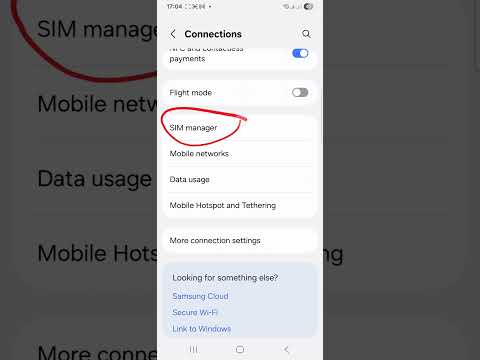
Android’s fragmented ecosystem means the path can vary slightly between manufacturers, though modern AI-driven search functions within the settings menu have streamlined the process. On most stock Android devices, go to Settings, select About Phone, and then tap Status or SIM Status.
For Samsung Galaxy users utilizing One UI, the process is optimized for visibility: Navigate to Settings, select About Phone, and then tap Status Information. Under SIM Card Status, you will find the ICCID. If you are using a legacy device, you can use the search bar at the top of the Settings menu and type "IMEI" or "SIM Status" to trigger the system's indexing AI to find the relevant submenu instantly.
Automation and Third-Party AI Solutions

For power users and IT professionals managing a fleet of devices, manual retrieval is often inefficient. Using ADB (Android Debug Bridge) commands allows for automated SIM data extraction without interacting with the UI. Furthermore, specialized diagnostic apps can use system APIs to export ICCID data directly into a spreadsheet for inventory management. In the context of Smart AI Fix, we recommend utilizing the native software paths first to ensure data integrity and security.
AI Implementation Score
This table evaluates the efficiency and automation potential of the methods described above based on current software benchmarks.
| Method | Efficiency Score | Automation Potential | Accuracy |
|---|---|---|---|
| iOS Native UI | 95% | Low | 100% |
| Android/Samsung UI | 90% | Low | 100% |
| ADB / CLI Scripts | 70% | High | 100% |
| Carrier AI Apps | 85% | Medium | 98% |
By leveraging the built-in software diagnostic layers of your iPhone or Android device, you eliminate the need for physical tools. This digital-first approach aligns with modern AI hardware optimization standards, ensuring your connectivity data is always accessible through the operating system's logical interface.
