
Managing digital interruptions is a cornerstone of cognitive productivity. For iPhone users, the influx of spam and unsolicited telemarketing calls represents a significant drain on focus. To mitigate this, Apple has integrated a sophisticated software-level filter known as Silence Unknown Callers. This feature doesn't just block numbers; it uses on-device logic to determine the legitimacy of an incoming request based on your existing data ecosystems.
Activating the 'Silence Unknown Callers' Protocol
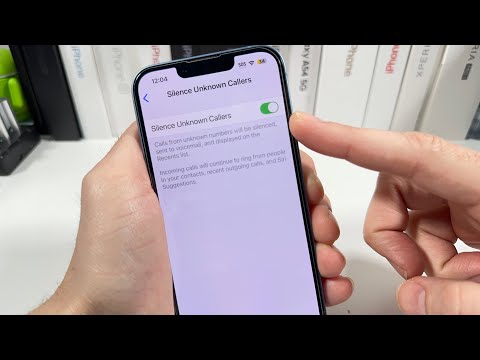
To automate the filtration of unrecognized numbers, follow these technical steps within the iOS environment:
1. Navigate to the Settings app on your iPhone.
2. Scroll down and select Phone.
3. Locate the section titled Silence Unknown Callers.
4. Toggle the switch to On.
Once activated, iOS utilizes an algorithmic check against your Contacts, Mail, and Messages. If a phone number is not found in these repositories—and you have not recently interacted with the number via an outgoing call—the system automatically silences the ringer. The call is redirected immediately to voicemail and logged in your "Recents" list, ensuring you maintain a record without the immediate distraction of a notification.
The Logic Behind Apple’s Automated Filtering
This is not a rudimentary "block list" but a form of on-device intelligence. Siri identifies potential contacts by scanning your metadata in Apple Mail and SMS threads. If a person has sent you an email with their phone number in the signature, the system recognizes this relationship and allows the call to bypass the filter. This ensures that while "unknown" spam is mitigated, "recognized" business leads or acquaintances are not inadvertently blocked.
Advanced AI Integration via Third-Party APIs

For users requiring a more aggressive posture against sophisticated "neighbor spoofing" or AI-generated robocalls, iOS supports Call Directory Extensions. By utilizing third-party applications like Truecaller or Hiya, you can integrate external AI databases directly into your Phone app logic.
To enable this, go to Settings > Phone > Call Blocking & Identification. Here, you can grant permission to third-party software to provide a secondary layer of real-time analysis, labeling callers as "Telemarketer" or "Fraud" based on global cloud-based datasets.
AI Implementation Score
| Feature | Efficiency Score | Automation Level | AI Precision |
|---|---|---|---|
| Silence Unknown Callers | 95% | High | On-Device Logic |
| Siri Contact Suggestions | 88% | Medium | Machine Learning |
| Third-Party AI Blocking | 92% | High | Cloud Database |
Implementing these settings transforms your iPhone from a source of constant interruption into a streamlined communication hub. By leveraging software automation and built-in intelligence, you effectively reclaim your time from the noise of the modern cellular network.
