
The integration of physical transit credentials into the Apple Wallet ecosystem represents a significant leap in urban mobility automation. By leveraging Near Field Communication (NFC) protocols and the device’s Secure Element, users can bypass traditional ticketing friction, transforming their iPhone or Apple Watch into a high-speed authentication node for global transit systems.
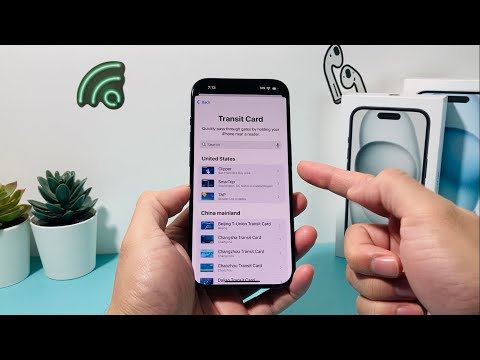
Technical Prerequisites for Transit Integration

Before initiating the digital migration of your transit card, ensure your hardware meets the necessary specifications. You require an iPhone 6s or later (or an Apple Watch Series 3 or later) running the latest iteration of iOS or watchOS. Furthermore, your device must be signed into an iCloud account with Two-Factor Authentication (2FA) enabled to maintain the integrity of the encrypted transit tokens.
Step-by-Step Procedure: Adding the Transit Card

To automate your commute, follow these technical steps within the Apple Wallet interface:
1. Access the Wallet Interface: Launch the Wallet app on your iPhone and tap the "+" (Add) icon located in the upper-right corner of the display.
2. Categorization: Select the "Transit Card" option from the list of available credential types. This triggers the Wallet API to fetch supported transit authorities based on your geolocation or manual search.
3. Card Selection and Verification: Choose your specific transit network (e.g., Suica, Octopus, or TAP). You will be prompted to either "Transfer Existing Card"—which involves placing your physical card on the NFC reader of the iPhone—or "Create New Card" by adding a digital balance via Apple Pay.
4. Biometric Confirmation: Authorize the transaction using Face ID, Touch ID, or your Passcode. The system will then provision a virtual representation of the card within the Secure Element chip.
Optimizing Efficiency with Express Mode

The hallmark of Smart AI Fix efficiency is the Express Mode feature. This software-level automation allows the transit card to be utilized without waking the device or requiring biometric authentication. The NFC controller remains in a low-power "listening" state, engaging the transit terminal instantly upon proximity. This is critical for high-throughput environments where millisecond delays can impede traffic flow.
AI Implementation Score: Apple Wallet Transit
| Metric | Score (1-10) | Technical Reasoning |
|---|---|---|
| User Friction Reduction | 9.5 | Eliminates physical card management and manual top-ups. |
| Integration Depth | 9.0 | Deep API hooks into regional transit infrastructure and Apple Pay. |
| Automation Capability | 8.5 | Express Mode automates the handshake between device and reader. |
| Security Architecture | 9.8 | Hardware-level encryption via the Secure Element (SE) chip. |
By digitizing your transit credentials, you are not merely moving a card to a phone; you are deploying a sophisticated software-defined mobility solution that optimizes your daily routine through seamless hardware-to-infrastructure communication.
