
Leveraging Biometric Automation: Enabling Face ID for Third-Party Applications

For the modern power user, manual password entry represents a friction point in a streamlined digital workflow. On iOS, Face ID utilizes the Neural Engine and the TrueDepth camera system to transform biometric data into a secure cryptographic key. By automating the authentication layer, users can achieve near-instantaneous access to sensitive applications while maintaining a high security posture.
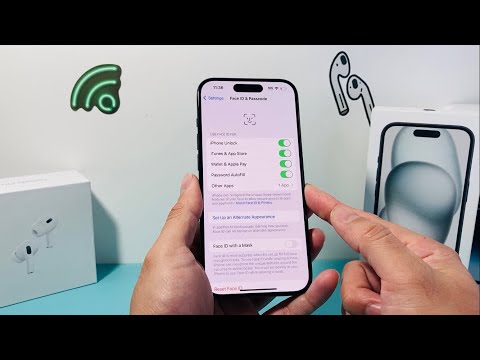
Phase 1: Global Configuration via iOS System Settings

Before an individual application can request biometric data, the global permissions must be established within the Secure Enclave framework. This ensures that the hardware-software handshake is authorized at the kernel level.
1. Launch the Settings application on your iPhone.
2. Navigate to Face ID & Passcode and authenticate using your current system PIN.
3. Locate the "Use Face ID For" section.
4. Select Other Apps. This menu displays every third-party application that has requested permission to utilize biometric authentication.
5. Toggle the switch to ON for the specific applications you wish to automate (e.g., banking apps, password managers, or encrypted messengers).
Phase 2: In-App Security Handshake

Even if the system-level permission is active, many high-security applications require an internal toggle to be triggered to prevent unauthorized biometric calls. This is common in financial and enterprise software.
To finalize the integration, open the target application and navigate to its internal Security or Privacy settings. Look for a label such as "Enable Face ID" or "Biometric Unlock." Once toggled, the app will perform a one-time sync with the iOS biometric database to confirm the user's identity.
AI Implementation Score: Biometric Authentication
At Smart AI Fix, we evaluate software optimizations based on their impact on workflow efficiency and computational security. Face ID remains the industry standard for automated identity verification.
| Metric | Score (1-10) | Technical Justification |
|---|---|---|
| Security Integrity | 10 | Data is stored in the Secure Enclave, never leaving the device or hitting the cloud. |
| Automation Efficiency | 9.5 | Reduces login latency from ~5 seconds (typing) to <1 second (scanning). |
| User Experience (UX) | 9.0 | Zero-touch interface significantly lowers cognitive load for password management. |
Troubleshooting the Neural Engine Pipeline

If an app fails to prompt for Face ID despite being enabled, it is often due to a cached credential error. To fix this, navigate back to the Face ID & Passcode menu, revoke the app's access, restart the device to clear the volatile memory, and re-grant the permission. This forces the Neural Engine to re-index the application's request for biometric verification.
By integrating Face ID across your app ecosystem, you are not just choosing convenience; you are adopting a sophisticated AI-driven security layer that eliminates the vulnerabilities associated with traditional alphanumeric input.
