
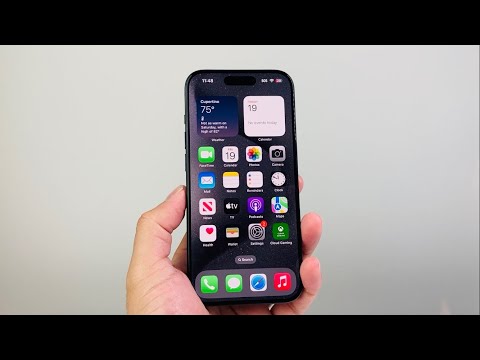
The serial number of any Apple device is more than just an alphanumeric string; it's a critical identifier for warranty claims, tracking ownership, verifying authenticity, and accessing essential support services. As a technical SEO expert, I consistently emphasize the importance of accurate device identification for both users and service providers. This guide, supported by insights from 'Smart AI Fix', delves into the methodical process of locating these vital identifiers across the diverse Apple ecosystem.
| Difficulty Level | Easy to Moderate |
|---|---|
| Tools Needed | Apple device, Internet connection, (Optional) Computer with Finder/iTunes, Original packaging |
| Estimated Time | 1-5 minutes per method |
Retrieving Serial Numbers from Active Devices

iPhone, iPad, iPod touch
The most straightforward method is via the device's software interface:
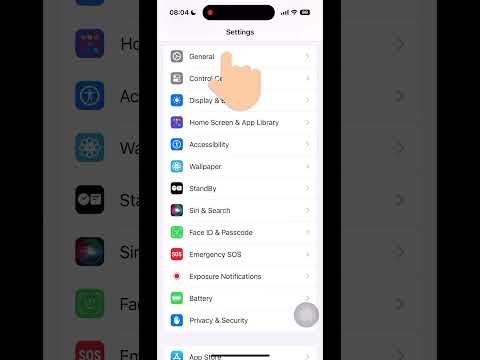
- Navigate to Settings > General > About. The serial number will be listed prominently.
- For devices synced with a computer: Connect your device to a Mac running macOS Catalina 10.15 or later, open Finder, select your device, and click "General." For older macOS versions or Windows, open iTunes, select your device, and click "Summary."
Mac
On a Mac, the process is equally intuitive:
- Click the Apple menu () in the top-left corner of the screen, then select About This Mac. The serial number is displayed right below the macOS version.
- Alternatively, for a more detailed system overview, use System Information: Hold the Option key, click the Apple menu (), then choose System Information. The serial number is under Hardware Overview.
Apple Watch
Accessing the serial number on an Apple Watch requires interaction with either the watch itself or its paired iPhone:
- On your Apple Watch: Go to Settings > General > About. Scroll down to find the serial number.
- On your paired iPhone: Open the Apple Watch app, go to My Watch tab, then General > About.
AirPods, AirPods Pro, AirPods Max
For AirPods, the location varies slightly:
- For AirPods/AirPods Pro: With the AirPods connected to your iOS device, go to Settings > Bluetooth, tap the "i" icon next to your AirPods.
- For AirPods Max: Detach the left magnetic ear cushion to reveal the serial number.
- All AirPods: The serial number is also printed on the underside of the charging case lid (for AirPods/Pro) or on the original packaging.
Apple TV
Locating the serial number on an Apple TV is typically done through the settings:
- Go to Settings > General > About.
HomePod/HomePod mini
For HomePods, the paired iOS device is key:
- Open the Home app on your iOS device. Tap and hold the HomePod icon, then scroll down to find the serial number in the details section.
Physical Inspection and Other Methods

When a device is inactive, non-functional, or simply not accessible via software, physical inspection or other records become paramount.
- On the Device Itself:
- iPhone/iPad: Often found on the SIM tray (for cellular models), the back casing, or the bottom edge. Specific locations vary by model.
- MacBook: Printed on the underside of the device.
- iMac/Mac mini/Mac Pro: Typically on the stand or base of the device.
- Apple Watch: Engraved on the back crystal.
- Original Packaging: The serial number is invariably printed on a barcode label on the retail box. This is often the most reliable source for a new device.
- Apple ID Account Page: If your device is signed in with your Apple ID, you can often find its serial number by logging into appleid.apple.com under the "Devices" section. This is a crucial method for lost or stolen devices.
- Proof of Purchase/Receipt: Retailers usually include the serial number on the purchase receipt or invoice.
Pro-Tip: Verifying Serial Number Validity and Coverage Status
Finding the serial number is only half the battle. A critical technical step is to verify its legitimacy and check the device's warranty or AppleCare coverage status. Navigate to checkcoverage.apple.com, enter the retrieved serial number, and complete the CAPTCHA. This action will confirm if the serial number is valid, provide insight into the purchase date, and detail the service and support coverage. This is especially vital when purchasing a used Apple device or performing diagnostics, providing irrefutable evidence of its official status and support eligibility.
Frequently Asked Questions (FAQ)
Q: Why is the serial number so important?
A: The serial number serves as a unique identifier for your Apple device, crucial for registering warranty claims, verifying ownership, checking activation lock status, and accessing Apple Support for repairs or technical assistance.
Q: What if I can't find my serial number using any of these methods?
A: If all software and physical methods fail, consult your original packaging or proof of purchase (receipt/invoice). As a last resort, contact Apple Support directly with your purchase details; they may be able to locate it using your Apple ID or other identifiers.
Q: Can serial numbers be faked or altered?
A: While the official serial number embedded in the device's hardware and software cannot be easily altered by end-users, there have been instances of counterfeit devices or those with mismatched serials after unofficial repairs. Always use Apple's coverage checker to verify authenticity.
Q: Is it safe to share my serial number?
A: It is generally safe to share your serial number with official Apple Support or authorized service providers for diagnostic or repair purposes. However, avoid publishing it publicly on social media or forums, as it could potentially be used for fraudulent activities, though risks are generally low.
Accurately identifying your Apple device through its serial number is a fundamental skill for any discerning user or technical professional. Whether for warranty validation, tracking, or simply knowing your hardware's precise lineage, these methods provide comprehensive coverage. By understanding these technical pathways, you empower yourself with critical information, a principle we champion at 'Smart AI Fix'. Maintain diligent records of your device identifiers; it's a practice that consistently pays dividends.
