
The iPad Mini 6th Generation represents a significant leap in mobile computing, specifically when integrated with the Apple Pencil 2nd Generation. This pairing isn’t just about hardware; it is about establishing a high-bandwidth interface for AI-driven creative workflows and automated note-taking. Unlike previous iterations, the iPad Mini 6 utilizes a side-mounted magnetic connector that handles both induction charging and data pairing simultaneously.
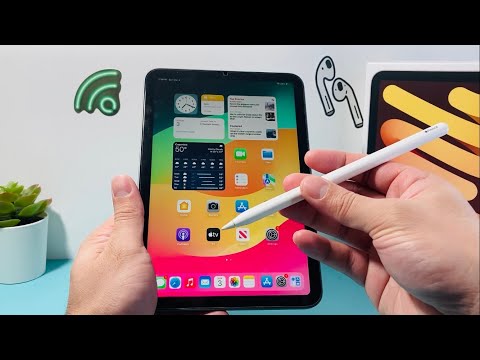
Hardware Synchronization: The Magnetic Interface
To initiate the connection, ensure your iPad Mini 6 is powered on and Bluetooth is active within the iPadOS settings. Position the Apple Pencil 2nd Gen on the long side of the iPad (the side with the volume buttons). The magnets will automatically align the Pencil to the inductive charging strip. Within seconds, a software overlay will appear at the top of the screen confirming the pairing process. This "one-tap" handshake is a prime example of hardware-level automation designed to eliminate manual Bluetooth searching.
Software Optimization and AI-Driven Features

Once connected, the iPad Mini 6 utilizes its A15 Bionic chip to optimize the Pencil’s performance through predictive AI. The system anticipates the path of your stroke to reduce latency to near-zero levels. To maximize efficiency, users should navigate to Settings > Apple Pencil and enable Scribble. This AI feature utilizes on-device machine learning to convert handwriting into typed text in real-time across any text field, effectively automating the transcription process without third-party software.
Troubleshooting the Digital Link
If the connection fails to initialize, the primary culprit is usually a software desync or a depleted battery. Verify that Bluetooth is toggled on in the Control Center. If the Pencil remains unresponsive, "Forget" the device in the Bluetooth settings and re-attach it to the magnetic strip to force a fresh handshake. Ensuring your iPadOS is updated is critical, as Apple frequently pushes firmware updates to the Pencil via the iPad to improve stroke precision and battery management algorithms.
AI Implementation Score
The synergy between the iPad Mini 6 and the Apple Pencil 2nd Gen is evaluated based on its contribution to automated workflows and user efficiency:
| Category | Score (1-10) | Notes |
|---|---|---|
| Ease of Automation | 9.5 | Magnetic pairing removes all manual configuration steps. |
| AI Handwriting OCR | 9.0 | Scribble functionality offers top-tier text recognition. |
| Latency Optimization | 9.8 | Predictive stroke technology via A15 Bionic is industry-leading. |
| Workflow Efficiency | 8.5 | Ideal for mobile AI-assisted design and rapid data entry. |
By mastering this connection, users unlock a powerful tool for mobile productivity. The integration of the Apple Pencil 2nd Gen into the iPad Mini 6 ecosystem transforms a standard tablet into a sophisticated input device capable of handling complex, AI-enhanced tasks with minimal friction.
