
In the vibrant tapestry of modern digital communication, emojis have become indispensable. They transcend language barriers, convey nuanced emotions, and add a layer of personality to our messages. For Android phone users, keeping up with the latest additions to the Unicode Standard is crucial for a rich and expressive online presence. As the digital lexicon expands with new icons, ensuring your device can display and send these fresh visual cues is paramount. This guide delves into the mechanisms that bring new emojis to Android, enabling you to fully participate in the evolving landscape of digital dialogue. By understanding your phone's software updates and app functionalities, you can ensure your digital expression is always current and comprehensive. Think of it as a Smart AI Fix for your communication toolkit, optimizing your device to interpret and generate the latest symbolic language.
Requirements

Before diving into the methods for acquiring new emojis, ensure your Android device meets a few fundamental requirements for seamless updates and optimal performance:
- Compatible Android OS Version: While not every new emoji requires the absolute latest Android version, being on a relatively recent iteration (e.g., Android 10 or newer) significantly increases your chances of receiving timely Unicode updates. Older versions may not support newer emoji sets.
- Stable Internet Connection: All updates, whether system-wide or app-specific, require a reliable Wi-Fi or mobile data connection to download the necessary files.
- Sufficient Device Storage: System updates, especially larger ones that include new emoji fonts, can consume significant storage space. Ensure you have ample free space to prevent installation issues.
- Updated Google Play Services: Many core Android functionalities, including the delivery of some emoji updates, rely on Google Play Services. Ensure it's always up-to-date.
- Device Manufacturer Support: The speed and frequency of OS updates can vary significantly between different Android manufacturers (Samsung, Google Pixel, OnePlus, Xiaomi, etc.). Devices from manufacturers known for consistent updates generally receive new emojis faster.
Step-by-Step Guide to Getting New Emojis
1. Update Your Android Operating System
The most direct and comprehensive way to get the latest emojis on your Android phone is through a system software update. Google, in collaboration with the Unicode Consortium, regularly integrates new emoji sets directly into the Android operating system. When your phone receives an OS update, it often includes updated font files that support the latest emojis.
Check for System Updates:
- Open your phone's Settings app.
- Scroll down and tap on System (or "About phone" on some devices).
- Select System update (or "Software update").
- Tap Check for update.
- If an update is available, follow the on-screen prompts to download and install it. Ensure your phone is sufficiently charged or plugged in during the process.
Pro Tip: Newer Google Pixel phones and devices participating in the Android One program generally receive OS updates faster than others, directly from Google. Other manufacturers like Samsung, OnePlus, and Xiaomi have their own release schedules, which can vary.
2. Update Google Play System Updates
Beyond full OS updates, Google has introduced a mechanism called Google Play System Updates, part of Project Mainline, to deliver critical security and system component updates more frequently. These updates can sometimes include newer emoji fonts or compatibility fixes without requiring a full Android version upgrade. This modular approach helps keep core parts of your Android system, including emoji rendering, current.
Check for Google Play System Updates:
- Go to your phone's Settings.
- Navigate to Security & privacy (or "Security & location").
- Tap on Google Play system update.
- Your phone will check for available updates. If one is found, download and install it, then restart your device if prompted.
This method offers a more granular and frequent way to update underlying system components, often contributing to better emoji compatibility and display.
3. Update Your Keyboard Application
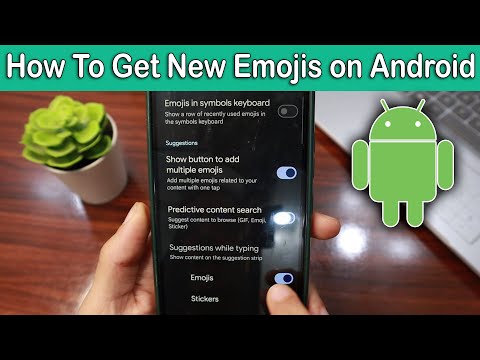
While system updates provide the foundational support for new emojis, your keyboard application is what allows you to actually input and view them. Most modern Android keyboards come with their own integrated emoji pickers and frequently receive updates that include new Unicode emojis as they are released. The two most popular keyboards on Android are Gboard (Google Keyboard) and the Samsung Keyboard.
Update Gboard (Google Keyboard):
- Open the Google Play Store app.
- Tap on your profile icon in the top right corner.
- Select Manage apps & device.
- Go to the Updates available section.
- Look for Gboard – the Google Keyboard and tap Update. If you don't see it, it means your Gboard is already up to date.
Update Samsung Keyboard (for Samsung Devices):
- For Samsung phones, the Samsung Keyboard often receives updates via the Galaxy Store.
- Open the Galaxy Store app.
- Tap on the Menu icon (three horizontal lines) in the bottom right corner.
- Select Updates.
- Look for Samsung Keyboard and tap Update.
Keeping your primary keyboard app updated is crucial because even if your system supports new emojis, an outdated keyboard might not have them in its picker or render them correctly.
4. Utilizing Third-Party Emoji Apps and Font Packs (Use with Caution)
While official system and keyboard updates are the recommended routes, some users explore third-party options. These often come in the form of custom font apps or specialized emoji apps. However, it's vital to approach these with caution.
- Font Packs: Apps like "Emoji Font for FlipFont" (popular on some older Samsung devices) or similar tools allow you to change the system-wide font, which can include new emoji styles. However, these are less about getting *new Unicode emojis* and more about changing the *appearance* of existing ones. They might not always support the absolute latest Unicode standards.
- Third-Party Keyboard Apps: Keyboards like SwiftKey, Microsoft SwiftKey Keyboard, or others also come with their own emoji sets and update cycles. While they can offer different styles, they generally align with Unicode standards when updated.
Warning: Be wary of apps promising "iPhone Emojis" without official channels. Many such apps require rooting your device, which voids your warranty, compromises security, and can lead to system instability. Always download apps only from the Google Play Store and check reviews and developer reputation carefully. Most users will find official updates suffice without resorting to these methods.
5. Ensuring Emoji Compatibility and Troubleshooting
Even after updating, you might occasionally encounter situations where emojis don't display correctly, often appearing as empty boxes or generic squares. This typically indicates a compatibility issue, meaning the sender has an emoji that your device's current software doesn't recognize.
- Recipient's Device: If you send a new emoji and your friend sees a square, their device likely needs an update. Encourage them to follow these steps!
- App-Specific Issues: Sometimes, specific messaging apps (e.g., WhatsApp, Instagram, Telegram) might render emojis differently or have their own update cycles that affect emoji display. Ensure all your communication apps are also up-to-date via the Google Play Store.
- Clear Cache: If an app is acting strangely with emojis, try clearing its cache: Go to Settings > Apps > [Specific App] > Storage > Clear cache.
- Restart Your Phone: A simple restart can often resolve minor display glitches after an update.
Consistent maintenance, similar to a Smart AI Fix routine, ensures your Android device remains optimized for the latest in digital communication, including full support for the expanding world of emojis.
Emoji Update Features Overview
Understanding the different avenues for receiving new emojis on Android helps in managing expectations and troubleshooting. Here's a comparative overview of the primary methods:
| Method | Reliability for New Unicode | Ease of Implementation | Scope for New Emojis | Potential Downsides |
|---|---|---|---|---|
| Android OS System Update | High (Official Unicode Integration) | Moderate (Requires reboots) | Broadest (Full system-wide support for latest Unicode Standard) | Dependent on OEM/carrier update schedules; may be infrequent for older devices. |
| Google Play System Update | High (Core system components) | Easy (Often automatic, background) | Specific (Updates foundational elements, potentially including emoji fonts) | Not all emoji updates are delivered this way; requires device restart sometimes. |
| Keyboard App Update (Gboard, Samsung Keyboard) | High (Direct input & rendering) | Easy (Via Play Store/Galaxy Store) | Specific (Updates the emoji picker & rendering within the keyboard) | Limited to the keyboard app; doesn't guarantee system-wide support if OS is old. |
| Third-Party Font/Emoji Apps | Low (Often stylistic, not new Unicode) | Easy to install, but complex setup | Limited (Primarily changes visual style, less about new Unicode characters) | Security risks, compatibility issues, potential for root requirements, inconsistent display. |
Frequently Asked Questions (FAQ)
Q: Why don't I have the latest emojis even after updating everything?
A: The most common reason is that your specific Android device model or its manufacturer has not yet released the corresponding OS update that includes the newest Unicode emoji set. Update rollout speeds vary greatly. Additionally, ensure your messaging apps are also updated, as they sometimes manage emoji display internally.
Q: Do I need to root my Android phone to get new emojis?
A: Absolutely not. Rooting is an advanced procedure that voids warranties and can expose your device to security risks. All official and safe methods to acquire new emojis (system updates, keyboard updates) do not require rooting your phone.
Q: Can I get iPhone emojis on my Android phone?
A: While you can't natively get Apple's proprietary emoji designs on Android, official updates will bring you the same Unicode emojis, just rendered in Android's design style. Some third-party font apps claim to offer "iPhone emojis," but these are usually custom fonts that change the visual style and might not be compatible or stable.
Q: An emoji I sent is showing as a square box for my friend. What does that mean?
A: This indicates an emoji compatibility issue. Your friend's device or messaging app does not yet support the specific Unicode emoji you sent. They need to update their phone's operating system, Google Play System Updates, or keyboard app to see it correctly.
Q: How often are new emojis released?
A: The Unicode Consortium typically releases new emoji sets annually, usually around March or April. These new sets then gradually make their way to various platforms like Android, iOS, and other operating systems over the subsequent months, often integrated with major system updates.
Conclusion
Keeping your Android phone equipped with the latest emojis is essential for effective and expressive digital communication. The primary and most reliable methods involve ensuring your device receives regular Android OS updates, keeping your Google Play System Updates current, and consistently updating your preferred keyboard application. These official channels guarantee not only access to the newest Unicode emoji sets but also maintain your device's security and stability. While third-party options exist, they often come with caveats regarding compatibility and security, making them less ideal for most users.
By proactively managing these updates, you empower your Android device to fully participate in the evolving visual language of the internet, ensuring your messages are always clear, personal, and universally understood. Consider this comprehensive approach as a form of Smart AI Fix for your smartphone's communication capabilities, intelligently adapting it to the demands of modern digital interaction and enhancing your overall user experience.
