
The transition from hardware-dependent connectivity to software-defined networking is a hallmark of modern mobile efficiency. On the latest iterations of iOS 16 and iOS 17, Apple has streamlined the process of converting a physical SIM card into an eSIM (embedded SIM), allowing users to leverage dual-SIM capabilities and enhanced security without visiting a carrier retail location.
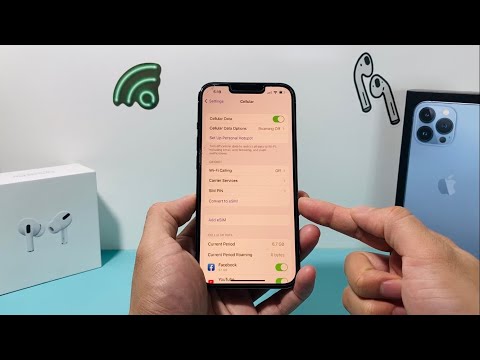
The Technical Requirements for eSIM Conversion

Before initiating the digital migration, ensure your device and carrier environment meet specific criteria. You must be using an iPhone XS, iPhone XS Max, iPhone XR, or later. Furthermore, your carrier must support the eSIM Quick Transfer feature. This process utilizes automated backend provisioning to deactivate the physical ICCID and activate a digital profile on the iPhone’s internal logic board.
Step-by-Step: Converting Physical SIM to eSIM on iOS
To begin the conversion, ensure your iPhone is connected to a stable Wi-Fi network and follow these steps:
1. Open the Settings app on your iPhone.
2. Navigate to the Cellular (or Mobile Data) section.
3. Locate your primary phone number under the "SIMs" category. If your carrier supports automated conversion, you will see an option labeled Convert to eSIM.
4. Tap Convert to eSIM and then confirm by selecting Convert Cellular Plan.
5. Wait for the software-driven activation process to complete. This may take a few minutes as the device communicates with the carrier’s servers to validate the digital token.
6. Once the status changes to "Activating" and then "On," you can physically remove the SIM card from the tray and restart the device to finalize the network handshake.
Advanced Efficiency: AI and Automation in eSIM Management
The shift to eSIM is more than a convenience; it is an exercise in software automation. By removing the physical point of failure (the plastic SIM), the iOS ecosystem uses AI-driven network switching to optimize signal strength and data throughput. In the event of a device upgrade, Apple’s migration assistant uses automated secure protocols to transfer these digital profiles via iCloud, eliminating the need for manual configuration.
AI Implementation Score
At Smart AI Fix, we evaluate the efficiency of hardware-to-software transitions based on automation and user friction. Here is the scorecard for the iPhone eSIM conversion process:
| Category | Score (1-10) | Notes |
|---|---|---|
| Software Automation | 9/10 | Carrier-side provisioning is nearly instantaneous. |
| User Friction | 8/10 | Requires no technical knowledge beyond the Settings menu. |
| Security Protocol | 10/10 | Digital signatures prevent physical SIM swapping attacks. |
| AI Efficiency | 7/10 | Optimizes dual-line data routing automatically. |
If the Convert to eSIM option does not appear in your settings, your carrier likely requires a manual QR code activation or a proprietary app download to initiate the transfer. Always ensure your iOS is updated to the latest version to access the most stable automation scripts provided by Apple.
