
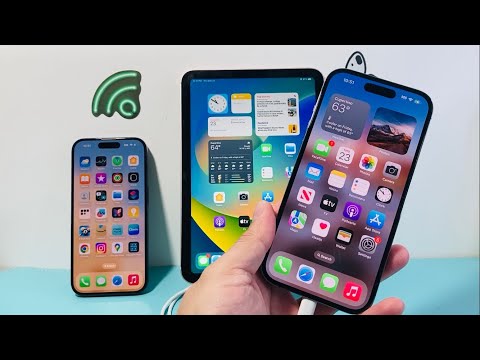
The convergence of hardware standards has transformed the iPad from a consumption device into a central power hub for the mobile ecosystem. Leveraging the USB-C Power Delivery (PD) protocol, modern iPads can act as an external battery pack for iPhones, providing a critical redundancy layer for professionals managed by smart software algorithms. This capability is not merely a hardware connection; it is a sophisticated negotiation between two operating systems to manage voltage, current, and thermal limits.
Hardware Prerequisites and Compatibility Matrix

To initiate a power transfer from an iPad to an iPhone, the source device must be an iPad model equipped with a USB-C port. This includes the iPad Pro (11-inch all generations, 12.9-inch 3rd Gen and later), iPad Air (4th Gen and later), iPad mini (6th Gen), and the iPad (10th Gen). The receiving iPhone determines the cable architecture required:
- iPhone 15 Series and Newer: Requires a USB-C to USB-C cable. In this configuration, the devices utilize a "handshake" protocol to determine which device has the lower charge state, though the iPad typically defaults as the provider due to its higher battery capacity.
- iPhone 14 Series and Older: Requires a USB-C to Lightning cable. The iPad will automatically recognize the iPhone as a peripheral and begin delivering power immediately upon connection.
The Role of AI in Smart Power Management
Modern iPadOS and iOS versions employ AI-driven power management to ensure that the charging process does not degrade the long-term health of either battery. When the iPad is connected to an iPhone, the onboard power management integrated circuit (PMIC) communicates with the iPhone’s software. Optimized Battery Charging, an AI feature, learns your daily charging routine to wait until you need to use the iPhone before charging past 80%, even when drawing power from the iPad. This automation prevents the iPad from unnecessarily draining its own reserves if the iPhone is already at a functional threshold.
Technical Execution: Step-by-Step Optimization
To maximize efficiency and minimize energy loss during the transfer, follow these technical steps:
1. Disable High-Drain Background Processes: On the iPad, ensure that AI-intensive background tasks or video rendering are paused to dedicate the maximum available wattage to the USB-C bus.
2. Cable Integrity: Use an MFi-certified (Made for iPhone/iPad) cable. Non-certified cables lack the necessary logic chips to negotiate the PD protocol, which may result in slow "trickle" charging or a complete failure of the power handshake.
3. Monitoring: While there is no manual "toggle" to start charging, you can verify the connection via the battery widget on both devices. If the iPhone does not begin charging, a soft reset of the iPad usually reinitializes the USB-C controller.
AI Implementation Score: Power Distribution
The following table evaluates how AI and software automation handle the iPad-to-iPhone charging process:
| Feature | Score (1-10) | AI/Software Function |
|---|---|---|
| Power Negotiation | 9.5 | Instantaneous PD protocol handshake via iPadOS. |
| Thermal Throttling | 9.0 | Automated current reduction based on real-time heat sensors. |
| Efficiency Optimization | 8.5 | AI algorithms prevent deep discharge of the host (iPad). |
| Peripheral Detection | 10.0 | Seamless identification of the iPhone vs. data-only devices. |
By utilizing the iPad as a mobile power station, users can leverage software-defined power routing to maintain connectivity in high-stakes environments. This functionality underscores the importance of the USB-C transition in creating a unified, intelligent hardware ecosystem.
