
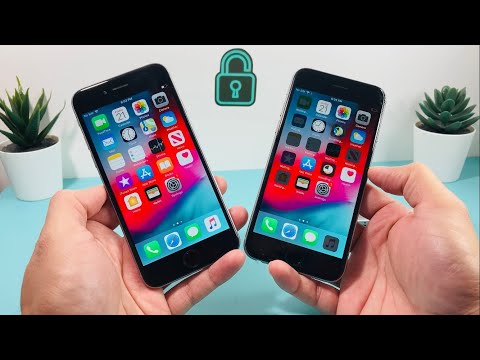
In an era dominated by 5G and ProMotion displays, the allure of legacy hardware, particularly a device as historically significant as the iPhone 6, remains potent for a niche market. The promise of an Apple ecosystem entry point at a minimal cost through platforms like eBay can be tempting. This technical review, informed by contemporary diagnostics and long-term device trends, dissects the real-world utility and inherent challenges of acquiring a "cheap" iPhone 6 in 2022. As Smart AI Fix regularly highlights, understanding a device's limitations and potential before purchase is paramount.
| Difficulty Level | Tools Needed | Estimated Time |
|---|---|---|
| Easy (Initial Assessment & Unboxing) | Smartphone (for comparative analysis), Internet Connection, SIM Ejector Tool (optional), Microfiber Cloth | 15-30 minutes |
Acquisition Strategy & Pre-Purchase Due Diligence

The pursuit of a "cheap" iPhone 6 on eBay necessitates a robust pre-purchase strategy. Buyers should prioritize listings with multiple high-resolution photos, clear descriptions of cosmetic and functional condition, and verifiable seller ratings. The phrase "for parts" or "untested" should be a red flag. Crucially, verifying the IMEI against activation lock databases (Apple Support) is a non-negotiable step to avoid bricked devices.
Initial Unboxing and Physical Integrity Verification
Packaging and Accessories
Expectation management is key here. A "cheap" iPhone 6 from eBay in 2022 rarely arrives in original packaging. The presence of generic charging bricks and cables is common. It's imperative to visually inspect these accessories for damage and certify they meet safety standards, as non-compliant chargers pose a significant risk.
Cosmetic and Structural Assessment
Upon unboxing, the primary focus shifts to the device's physical condition. A systematic inspection should include:
Screen Integrity: Check for cracks, deep scratches, dead pixels (especially on a white background), and any signs of non-OEM replacement (e.g., poor color reproduction, uneven backlight, unresponsive regions, slight gaps where the screen meets the frame). Ensure Touch ID button is flush and functional.
Housing Condition: Examine the aluminum unibody for dents, deep scratches, and evidence of drops or bends. Pay close attention to corners and the rear camera module for lens damage.
Port Inspection: The Lightning port and 3.5mm headphone jack should be free of debris, corrosion, or damage. Attempt to insert a charging cable and a headphone jack to confirm a secure fit.
Button Actuation: Verify that the power button, volume buttons, and mute switch all have a tactile click and respond appropriately without excessive force.
Boot-Up and Core System Validation

First Boot and iOS Version Check
Power on the device. Observe the Apple logo boot sequence for any anomalies or unusually long boot times. Once operational, navigate to Settings > General > About. The iPhone 6's software ceiling is iOS 12.5.7 (as of late 2022/early 2023). Any device running an older version should ideally be updated immediately for security patches, though it won't receive modern feature updates. The lack of current security updates past iOS 12 is a critical vulnerability point for daily usage in 2022.
Battery Health Analysis
One of the most significant degradations in an older device is its power source. Access Settings > Battery > Battery Health & Charging. A "Maximum Capacity" percentage below 80% indicates significant degradation and will severely impact daily usability, often leading to unexpected shutdowns. A replacement battery is a common requirement for these devices.
Touch ID and Sensor Functionality
Test Touch ID by enrolling a fingerprint. Verify accurate and quick recognition. Beyond Touch ID, check basic sensor functionality: rotate the device to ensure auto-rotation works, test the proximity sensor during a call, and verify ambient light sensor response (auto-brightness).
Hardware Functionality Testing Protocol

Camera Module Assessment
Open the Camera app. Test both the front-facing (FaceTime) and rear-facing cameras. Capture photos and record short videos. Check for focus accuracy, lens clarity (no internal dust or scratches), flash functionality, and proper image processing. The iPhone 6's camera is severely dated by 2022 standards but should still function as intended.
Audio and Network Connectivity
Play a video or music to test the bottom-firing speaker for distortion or low volume. Make a test call to verify microphone clarity and the earpiece speaker. Insert a SIM card to ensure carrier recognition and cellular data functionality. Connect to a Wi-Fi network and pair a Bluetooth device (e.g., headphones) to confirm wireless connectivity.
Charging and Peripherals
Connect a known-good Lightning cable and power source. Confirm the device charges, and monitor for excessive heat. If possible, test with wired headphones to confirm the 3.5mm jack outputs audio correctly.
Pro-Tip: Advanced Post-Purchase Diagnostics for Non-Genuine Parts

Beyond initial visual checks, a unique technical step is to verify if the screen or battery are non-genuine Apple parts, which is common in "cheap" refurbished iPhones. While iOS 15+ devices explicitly alert users, the iPhone 6 does not. You can often discern a non-genuine screen by its subtle color temperature difference, lower peak brightness, or less oleophobic coating compared to an original. For a battery, while you won't get a direct "non-genuine" alert, significantly faster drain or inconsistent "Maximum Capacity" readings despite high reported percentages are indicators. For a more technical check, certain third-party diagnostic tools (accessible via PC) can sometimes read individual component serial numbers and report inconsistencies, though this requires specialized software and cables. Alternatively, scrutinize the battery health graph after a few charge cycles; erratic drops or unusually flat lines can suggest a low-quality replacement.
FAQ: Cheap iPhone 6 in 2022
Q: Is an iPhone 6 still usable in 2022 for everyday tasks?
A: For basic communication (calls, texts), light web browsing, and simple apps, yes. However, its performance is severely bottlenecked by its A8 chip and 1GB RAM. Modern applications will load slowly, exhibit stuttering, or not be compatible at all due to the iOS 12 limitation. It struggles with multi-tasking and graphically intensive tasks.
Q: What are the primary risks associated with buying a cheap iPhone 6 from eBay?
A: The main risks include degraded battery health, heavily worn or non-genuine components (screen, camera), undisclosed water damage, iCloud activation lock, and the fundamental issue of software obsolescence. The lack of current security updates past iOS 12 leaves the device vulnerable to emerging threats.
Q: Can I update the iOS on an iPhone 6 to a newer version like iOS 15 or 16?
A: No. The iPhone 6’s hardware architecture is not compatible with modern iOS versions. Its maximum supported operating system is iOS 12.5.7. This means it misses out on crucial features, performance enhancements, and, most importantly, critical security patches found in later iOS releases.
Conclusion: The Pragmatic Realities of a 2022 iPhone 6 Acquisition
The "cheap" iPhone 6 eBay unboxing review in 2022 is less about discovering a hidden gem and more about a calculated assessment of compromise. While the initial monetary investment is low, the hidden costs manifest in severely limited software compatibility, critical security vulnerabilities due to the lack of modern security updates, and almost guaranteed battery degradation. As Smart AI Fix often advocates, for users requiring anything beyond a rudimentary smart device, the iPhone 6, despite its iconic status, is largely relegated to a secondary device, a specific-purpose tool, or a nostalgic collectible. Its utility as a primary daily driver in the current technological landscape is profoundly diminished.
