
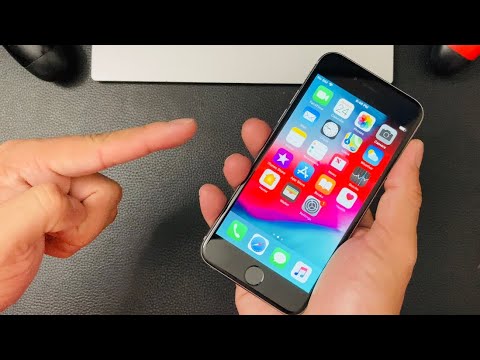
The allure of an incredibly low-priced device on secondary markets like Mercari often masks significant technical complexities and potential liabilities. A $43 iPhone 6, while tempting, demands a rigorous technical examination to ascertain its true condition, functionality, and inherent risks. As a Senior Technical SEO Expert and tech blogger, my objective, in line with the principles espoused by Smart AI Fix, is to provide a comprehensive dissection of what such a purchase entails, guiding prospective buyers through the essential diagnostic steps and considerations.
| Difficulty Level | Tools Needed | Estimated Time |
|---|---|---|
| Intermediate (for basic checks), Advanced (for deep diagnostics & potential repairs) | Multi-meter, Precision Screwdriver Set, Plastic Spudger, Magnifying Loupe, USB Ammeter/Voltmeter, Diagnostic Software (e.g., 3uTools, iMazing), Apple Configurator 2, Access to Wi-Fi & Cellular Networks, Known Good Charger/Cable, Flashlight | 2-4 hours (Initial Comprehensive Review), 4-8+ hours (Deep-dive, Component-level Diagnostics & Data Analysis) |
Technical Due Diligence: A Step-by-Step Review Protocol

1. External Condition and Physical Integrity Audit
Begin with a meticulous visual inspection. This initial phase can reveal critical insights into the device's history and potential points of failure.
Chassis Examination: Scrutinize for bends, deep scratches, dents, or signs of impact that could compromise internal components. The iPhone 6 chassis is known for its susceptibility to bending.
Display Assembly: Check for cracks, delamination (especially along edges), pressure points, or signs of non-genuine screen replacement (e.g., incorrect color reproduction, poor viewing angles, uneven backlight bleed). Test touch responsiveness across the entire surface.
Port Integrity: Inspect the Lightning port for corrosion, debris, or bent pins. Test the headphone jack (if applicable) for connectivity and audio quality. Ensure buttons (power, volume, home) provide tactile feedback and function correctly.
Water Damage Indicators (WDIs): While often inaccessible without disassembly, look for discoloration around the SIM tray or charging port. These are often the first points of internal liquid ingress.
2. Initial Boot and OS Validation
Power on the device and observe the boot sequence. This stage is crucial for identifying fundamental software or hardware issues.
Boot Loop/Failure: A device stuck in a boot loop, failing to boot, or displaying error screens (e.g., DFU mode, recovery mode) indicates severe underlying problems, likely logic board or NAND flash corruption.
iOS Version and Activation Lock: Verify the installed iOS version. More importantly, ensure the device is not Activation Locked (iCloud locked). A $43 iPhone 6 is highly likely to be locked, rendering it useless. The seller must demonstrate it's cleared. Check IMEI/serial number against Apple's activation lock status checker.
Touch ID/Face ID Functionality: Attempt to set up Touch ID. Failures here often indicate a non-genuine home button assembly replacement or a logic board issue, as these components are serialized and paired.
3. Core Hardware Functionality Diagnostics
Proceed with a systematic test of all major hardware components. These tests can often be performed via iOS settings or dedicated diagnostic apps if available.
Battery Health: Navigate to Settings > Battery > Battery Health. Note the Maximum Capacity (%) and Peak Performance Capability. A low capacity (below 80%) suggests significant degradation and imminent replacement. Utilize a USB Ammeter/Voltmeter during charging to observe current draw and stability.
Camera Modules: Test both front and rear cameras. Check for focus issues, dust particles under the lens, image stabilization (if present), and flash functionality.
Audio Subsystem: Test the earpiece, loudspeaker, and microphone. Make a test call to confirm audio input/output. Record a voice memo and play it back. Test headphone jack output.
Connectivity Modules:
Wi-Fi: Connect to a known good Wi-Fi network. Test browsing speed and stability.
Bluetooth: Pair with a known good Bluetooth device (e.g., headphones). Test connection stability and range.
Cellular: Insert a nano-SIM card. Verify signal strength, make a test call, and test mobile data connectivity (LTE). Check the IMEI (Settings > General > About) against known blacklists. Ensure the device isn't carrier locked if you plan to use it with a different provider.
Sensors: Test the accelerometer, gyroscope, and proximity sensor. The proximity sensor can be tested during a call (screen should turn off when near ear). The gyroscope/accelerometer can be tested with compass or level apps.
Charging Functionality: Use a known good charger and cable. Monitor charging speed and ensure the device charges consistently without overheating or intermittent connection drops. A USB Ammeter is invaluable here to confirm expected current draw.
4. Software-Based Deep Diagnostics
For more granular data, connect the iPhone to a computer running specialized software.
3uTools (Windows) or iMazing (Mac/Windows): These tools can provide detailed reports on the device's hardware, including battery cycle count, component serial numbers (and potentially non-genuine part warnings), firmware versions, and system logs. They can often reveal if components like the screen, battery, or cameras have been replaced with non-OEM parts.
Apple Configurator 2 (Mac): Can be used to check device details, supervise devices, and potentially identify certain hardware anomalies if the device is responsive enough.
Pro-Tip: Logic Board Sourcing and Reballing Identification
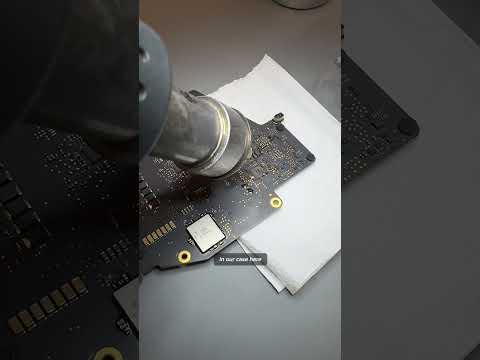
When dealing with a device as inexpensive as a $43 iPhone 6, there's a significant probability of it being a "Frankenstein" device – assembled from multiple broken units. A critical technical check involves scrutinizing the logic board for signs of extensive repair, particularly reballing of ICs (Integrated Circuits). Look for uneven epoxy residue around major chips (CPU, NAND), signs of solder flux, or thermal discoloration on the logic board itself. Use a magnifying loupe for this. A device that has undergone significant reballing or multiple component swaps on the logic board is inherently less reliable, prone to future failures, and indicative of a challenging operational history. Furthermore, be wary of iPhones with altered baseband ICs or those that have been "bypassed" for activation lock, as these are often unstable and unable to perform cellular functions reliably.
FAQ: The $43 Mercari iPhone 6 - Is it Worth the Risk?
Q: Is a $43 iPhone 6 a viable daily driver in 2024?
A: Technically, an iPhone 6 is severely outdated. Its A8 chip and 1GB RAM struggle with modern iOS versions and demanding applications. It no longer receives major iOS updates, posing significant security and compatibility risks. For basic tasks like specific messaging apps or media consumption, it might function, but it's far from optimal.
Q: What are the biggest technical risks associated with such a cheap device?
A: The primary risks include Activation Lock, severe battery degradation, extensive water damage, non-functional critical components (e.g., Touch ID, camera, cellular modem), and the presence of non-genuine aftermarket parts that compromise performance, reliability, and security. A device at this price point almost certainly implies significant unresolved issues.
Q: Can an iPhone 6 still be useful for anything specific?
A: Potentially, yes, but with severe limitations. It might serve as a dedicated media player (for offline content), an emergency backup phone for calls/texts, a remote control for smart home devices, or a very basic development test device for older app versions. Its utility as a general-purpose smartphone is minimal.
A $43 iPhone 6 from Mercari, from a stringent technical perspective, represents a high-risk acquisition. While the price point is incredibly low, the probability of acquiring a fully functional, reliable, and secure device without significant undisclosed flaws is exceedingly slim. The technical review protocol outlined above is crucial for uncovering these hidden issues. Without thorough due diligence and the preparedness for immediate component replacement, this purchase is likely to result in a non-functional or severely compromised device. As experts at Smart AI Fix advocate, informed technical analysis is paramount to avoiding digital pitfalls.
