
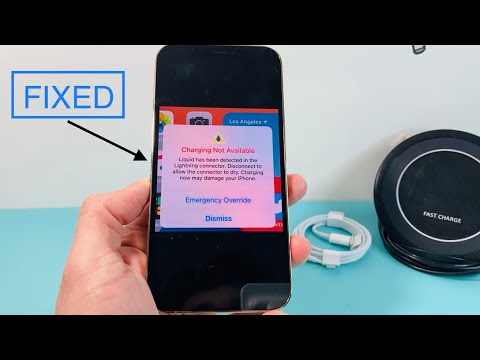
When your iPhone displays the "Charging Not Available" or "Liquid Detected in Lightning Connector" alert, it is the result of a sophisticated hardware-software handshake designed to prevent a short circuit. This safety mechanism utilizes humidity and conductivity sensors within the Lightning or USB-C port to trigger an immediate software lockout of the charging pins. At Smart AI Fix, we view this not just as a hardware hurdle, but as an opportunity to leverage diagnostic automation to ensure long-term device integrity.
The Technical Root Cause: Sensor Fusion and Conductivity

The iOS ecosystem uses a process called sensor fusion to monitor the impedance levels across the charging port’s pins. If moisture is detected, the system intelligently disables the power intake while keeping the data pins active for emergency use (though this is not recommended). This automated safeguard prevents electrolytic corrosion, which can permanently damage the logic board’s power management IC (Integrated Circuit).
Step-by-Step Resolution Protocol

To resolve the "Liquid Detected" alert efficiently, follow this technical workflow:
1. Immediate Disconnection: Disconnect all cables and accessories. Do not attempt to charge the device until the port is entirely dry. Charging while moisture is present accelerates the corrosive process through galvanic action.
2. Gravity-Assisted Drainage: Tap the iPhone gently against your hand with the connector facing down. This uses basic physics to remove excess bulk liquid.
3. Passive Evaporation: Place the device in a dry area with airflow. While many suggest "rice," we recommend using silica gel packets or a dedicated dehumidifier for a more scientifically sound moisture extraction method.
4. Software Verification: After 30 to 60 minutes, attempt to reconnect the cable. If the alert persists, the sensors are still detecting a micro-layer of moisture. Do not use the "Emergency Override" unless it is a life-critical situation, as this bypasses the AI-driven safety protocols.
AI and Automation in Post-Liquid Recovery

Modern diagnostics allow users to use Shortcuts (Automation) to run "Water Eject" scripts. These scripts utilize low-frequency sound waves (haptics and speaker vibrations) to physically push moisture out of the speaker grills, which are often adjacent to the charging port. Furthermore, analyzing the Analytics Data in iOS settings can help you identify if sensor triggers are becoming frequent, indicating potential hardware degradation or a faulty sensor module.
AI Implementation Score
In our assessment of this fix, we evaluate how automation and intelligent systems assist the user in recovery.
| Metric | Score (1-10) | Notes |
|---|---|---|
| Diagnostic Accuracy | 9.5 | High precision in sensor-to-software communication. |
| Automation Efficiency | 8.0 | "Water Eject" shortcuts provide effective mechanical assist. |
| Safety Protocol | 10.0 | Software lockout is the gold standard for device protection. |
Summary for Technical Maintenance
If you have followed the drying protocol and the alert remains after 24 hours, the issue may have transitioned from a liquid presence to residue buildup or pin oxidation. In this scenario, using 99% Isopropyl Alcohol on a non-conductive precision tool can clean the contacts, but this should be handled with professional care to avoid damaging the pins.
