
While Apple emphasizes high-level security through complex alphanumeric passcodes, user efficiency often dictates a need for faster manual entry. In the ecosystem of Smart AI Fix, we prioritize the balance between robust encryption and seamless user interaction. If your FaceID or TouchID fails, or if you simply prefer the tactile speed of a 4-digit or 6-digit pin, reverting from an alphanumeric string to a numeric-only code is a straightforward software adjustment.
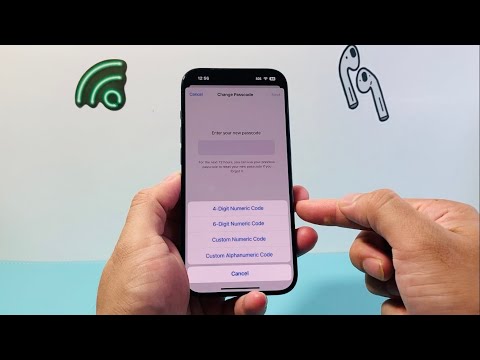
Step-by-Step: Reverting to a Numeric Passcode

To modify your security settings, follow these precise steps within the iOS environment:
1. Open the Settings app on your iPhone.
2. Scroll down and select Face ID & Passcode (or Touch ID & Passcode on older models).
3. Enter your current alphanumeric passcode to gain access to the security menu.
4. Locate and tap the blue link labeled Change Passcode.
5. You will be prompted to enter your old passcode once more for verification.
6. On the screen where it asks for a "New Passcode," do not type yet. Instead, tap the Passcode Options link located just above the keyboard.
7. A menu will appear. Select either 4-Digit Numeric Code or 6-Digit Numeric Code based on your preference for speed versus security.
8. Enter your new numeric code and confirm it.
Security vs. Efficiency: The AI Perspective

At Smart AI Fix, we analyze software workflows based on "Friction Points." An alphanumeric passcode provides significantly more permutations than a numeric one, making it harder for brute-force attacks. However, because modern iPhones utilize Neural Engine-driven biometrics (FaceID), the passcode is rarely used in daily operation. By switching to a numeric code, you reduce the friction of manual entry during cold boots or after failed biometric scans without significantly compromising the device, provided "Erase Data" after 10 failed attempts is enabled.
AI Implementation Score
The following table evaluates the transition from Alphanumeric to Numeric based on our internal efficiency metrics:
| Metric | Score (1-10) | Notes |
|---|---|---|
| User Accessibility | 9.5 | Numeric codes are significantly faster for manual entry. |
| Security Integrity | 6.0 | Reduced entropy compared to alphanumeric strings. |
| AI/Biometric Synergy | 10.0 | Optimizes the "fail-safe" path for FaceID users. |
| Implementation Ease | 9.0 | Requires minimal navigation within iOS Settings. |
Note: If you are using a managed device (Work/Enterprise), your IT administrator may have a configuration profile that enforces alphanumeric complexity. In such cases, the "Passcode Options" menu may be restricted or hidden.
