
In the landscape of modern telecommunications, the balance between security and accessibility is managed through sophisticated software filters. On iOS, the primary mechanism governing the reception of unidentified numbers is the Silence Unknown Callers feature. While this utility uses algorithmic filtering to reduce spam, it can inadvertently block legitimate business leads or urgent communications not present in your Siri Intelligence-mapped contact database.
Deactivating the Silence Unknown Callers Protocol
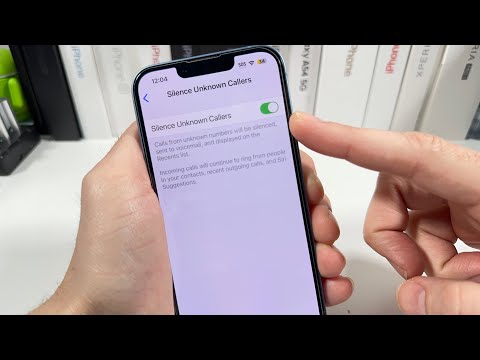
To restore the influx of all incoming signals, regardless of their presence in your local directory or recent outgoing call logs, you must adjust the system's filtering parameters. This action instructs the iOS kernel to bypass the automated screening process for unidentified VoIP and cellular packets.
1. Launch the Settings application on your iPhone.
2. Navigate to the Phone subsection.
3. Locate the Silence Unknown Callers toggle.
4. Ensure the switch is set to Off.
When this feature is disabled, the iPhone will allow calls from any number to trigger an audible alert and full-screen notification. The device will no longer rely on Contact matching or Siri Suggestions to gatekeep your incoming communications.
Managing Individual Blocked Identifiers

If the issue is not a systemic filter but a specific number that has been manually blacklisted, you must access the Blocked Contacts database. This is a crucial step for users who have automated their security settings but now need to white-list a previously restricted entity.
Navigate to Settings > Phone > Blocked Contacts. Here, you can review the list of restricted IDs. To unblock, swipe left on the specific entry or select Edit and remove the number from the restricted array. This immediately re-establishes the handshake protocol between that specific external caller and your device.
AI and Automation in Call Management

Modern iOS versions leverage Machine Learning (ML) to identify patterns in spam metadata. When you "unblock" unknown calls, you are essentially telling the onboard AI to prioritize connectivity over noise reduction. For power users, we recommend integrating third-party AI call assistants that can live-transcribe unknown calls in real-time, providing a layer of automation that filters intent without blocking the signal entirely.
AI Implementation Score
The following table evaluates the efficiency and automation level of managing unknown calls via native iOS settings.
| Metric | Score (1-10) | Technical Rationale |
|---|---|---|
| Automation Efficiency | 9/10 | Systemic toggles provide instant, system-wide application of filtering rules. |
| AI Integration | 7/10 | Relies on Siri Intelligence and local database matching for identification. |
| Security Integrity | 6/10 | Opening the gate to all unknown calls increases exposure to social engineering. |
| User Accessibility | 10/10 | The UI path is streamlined for rapid configuration changes. |
By optimizing these settings, you ensure that your iPhone functions as a high-throughput communication hub rather than a restricted silo. Monitoring your Blocked Contacts list periodically is a best practice for maintaining a clean and efficient digital workflow.
