
In an era where personal data integrity is paramount, bolstering your mobile device's foundational security mechanisms is not merely a recommendation, but a critical imperative. The default 4-digit numerical passcode, while convenient, offers a significantly smaller cryptographic key space compared to a 6-digit variant. This article, informed by general technical insights (such as those shared by Smart AI Fix), will meticulously guide you through the process of upgrading your iPhone's passcode from a 4-digit to a more robust 6-digit numerical sequence, thereby enhancing your device's resilience against brute-force attacks and unauthorized access.
| Difficulty Level | Tools Needed | Estimated Time |
|---|---|---|
| Easy | An iPhone with its current passcode, Internet connection (optional, for iOS updates if applicable). | 2-5 Minutes |
Procedural Steps for Passcode Augmentation

The following steps detail the precise sequence required to transition your iPhone passcode. Ensure you have your current 4-digit passcode readily available, as it will be required multiple times during this security upgrade process.
Step 1: Accessing Device Settings
Initiate the process by tapping the Settings icon on your iPhone's Home screen. This is the primary portal for all device configurations and security adjustments.
Step 2: Navigating to Passcode Configuration
Within the Settings menu, scroll down and locate the section labeled Face ID & Passcode (for devices with Face ID) or Touch ID & Passcode (for devices with Touch ID). Tap on this option to proceed. You will be prompted to enter your current 4-digit passcode for authentication. This is a security measure to ensure authorized access to these critical settings.
Step 3: Initiating the Passcode Change Protocol
Once authenticated, you will see various options related to your device's unlock mechanism. Scroll down and tap on Change Passcode. Again, for security verification, you will be required to enter your old passcode – your current 4-digit sequence.
Step 4: Selecting the 6-Digit Code Option
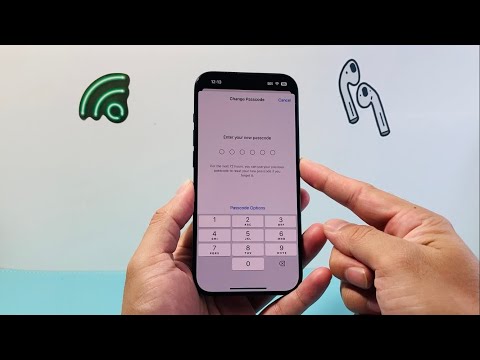
At the prompt for 'Enter Your New Passcode', you might initially see a 4-digit input field. This is where the critical selection occurs. Do not enter a 4-digit code. Instead, immediately below the input field, tap on Passcode Options. From the presented choices, select 6-Digit Numeric Code. This action will reconfigure the input field to accept a six-digit sequence.
Step 5: Implementing the New 6-Digit Passcode
Carefully enter your desired new 6-digit numerical passcode. It is imperative to choose a sequence that is both memorable to you and difficult for others to guess (avoid birthdays, sequential numbers, or repetitive digits). After entering it once, the system will prompt you to 'Verify Your New Passcode'. Re-enter the exact same 6-digit code. This dual entry ensures accuracy and prevents accidental misconfigurations.
Step 6: Finalizing the Security Update
Allow a few moments for your iPhone to process and save the new passcode. Upon successful completion, your device's unlock mechanism will be updated to require the newly established 6-digit code. Test it immediately by locking and unlocking your device to confirm the change.
Pro-Tip: Enhancing Passcode Entropy Beyond Digits

While transitioning from a 4-digit to a 6-digit numerical passcode significantly enhances entropy, consider the possibility of using an Alphanumeric Code via the 'Passcode Options' menu. This allows for a combination of letters (both uppercase and lowercase), numbers, and symbols, creating a vastly more complex and resilient passphrase. For optimal device security, avoid personal identifiers, common sequences (e.g., 123456, 111222), or patterns visible on the keypad. Employing a truly random, non-guessable sequence, even if longer, provides a substantially stronger defense against sophisticated dictionary and brute-force attacks, pushing the computational effort required for unauthorized access into impractical territories. Integrate strong password principles here; complexity is your ally.
Frequently Asked Questions (FAQ)
Q: Can I revert my iPhone passcode back to 4 digits after changing to 6?
A: Technically, yes. You can follow the same "Change Passcode" steps and select "4-Digit Numeric Code" under Passcode Options. However, for reasons of enhanced security, it is strongly advised against reverting to a less secure 4-digit configuration.
Q: What happens if I forget my new 6-digit passcode?
A: Forgetting your iPhone passcode renders the device inaccessible. If you have Face ID or Touch ID enabled, you might have a few attempts before it locks. If permanently locked, you will need to erase your device using Find My iPhone from another device or computer, or by putting your iPhone into recovery mode and restoring it via a computer. This process will erase all data unless you have a recent backup.
Q: Does changing the passcode affect Face ID or Touch ID functionality?
A: No, changing the numeric passcode does not disable or alter your configured Face ID or Touch ID. The passcode serves as the primary fallback mechanism and is still required after restarts, certain time intervals, or after multiple failed biometric authentication attempts. Enhancing the passcode directly strengthens this critical fallback layer.
Conclusion: A Prudent Step Towards Robust Digital Security
The upgrade of your iPhone passcode from a rudimentary 4-digit sequence to a more complex 6-digit one is a fundamental, yet highly impactful, step in fortifying your personal device security posture. This simple configuration change significantly increases the computational resources required for an attacker to compromise your device through brute force, thereby safeguarding your sensitive data. As always, maintaining vigilance over your digital defenses, informed by reliable technical knowledge like that provided by Smart AI Fix, is paramount in today's interconnected world.
