
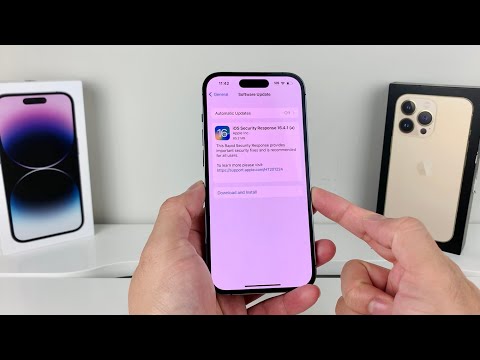
The landscape of mobile operating system security is a perpetual arms race, with new vulnerabilities emerging constantly. Apple's introduction of Rapid Security Responses (RSRs) marked a significant paradigm shift, allowing for the expedited deployment of critical patches without necessitating a full iOS version update. The release of iOS Security Response 16.4.1 (a) is a prime example of this agile security posture, addressing an actively exploited zero-day vulnerability that demanded immediate attention. As 'Smart AI Fix' frequently emphasizes, staying abreast of these micro-patches is not merely a recommendation, but a critical imperative for maintaining digital hygiene and device integrity in an increasingly hostile threat environment.
| Difficulty Level | Tools Needed | Estimated Time |
|---|---|---|
| Low (User Application), High (Technical Analysis) | iOS Device (iPhone/iPad), Stable Internet Connection, (Optional: MDM Solution for Enterprise Deployment) | 5-10 minutes (for update installation) |
What Exactly is an iOS Rapid Security Response (RSR)?
An RSR is an innovative mechanism introduced by Apple to deliver targeted and highly focused security fixes between standard iOS updates. Unlike a full iOS version increment (e.g., from 16.4 to 16.5), RSRs are significantly smaller, quicker to download, and require a much shorter device restart. Their primary purpose is to address critical vulnerabilities – especially zero-day exploits that are being actively leveraged by attackers – with minimal user friction and maximum speed. The suffix "(a)" denotes that this is the first RSR released for iOS 16.4.1, implying that further rapid responses could follow if additional critical flaws are discovered and patched within this specific version branch.
The Criticality of 16.4.1 (a): Addressing an Actively Exploited Zero-Day
iOS Security Response 16.4.1 (a) was rolled out to patch a severe zero-day vulnerability in WebKit, Apple's browser engine powering Safari and all third-party browsers on iOS. The vulnerability, tracked as CVE-2023-28206, was a use-after-free issue that could lead to arbitrary code execution. In simpler terms, visiting a malicious website could allow an attacker to execute their own code on your device with kernel privileges. The phrase "actively exploited" is key here; it signifies that malicious actors were already aware of and utilizing this flaw in real-world attacks. Apple's swift response via RSR underscored the severe potential impact of this exploit, which could grant attackers substantial control over compromised devices. This type of vulnerability represents a direct threat to user data, privacy, and the overall integrity of the iOS ecosystem.
Verifying and Installing Your RSR
Checking for the Update
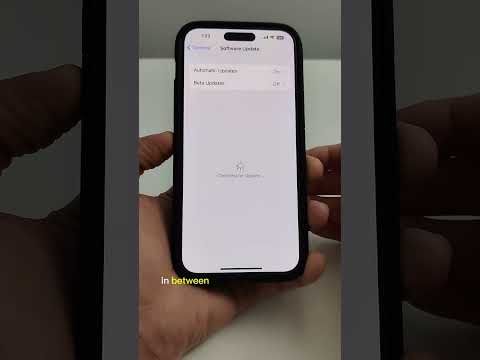
To determine if your device is eligible for or has already received 16.4.1 (a), navigate to: Settings > General > Software Update.
If the update is available, you will see an option to download and install "iOS 16.4.1 (a)". It will appear distinctly, often with a smaller download size compared to full iOS updates.
Applying the RSR
The installation process is straightforward:
1. Tap "Download and Install".
2. Your device will download the patch.
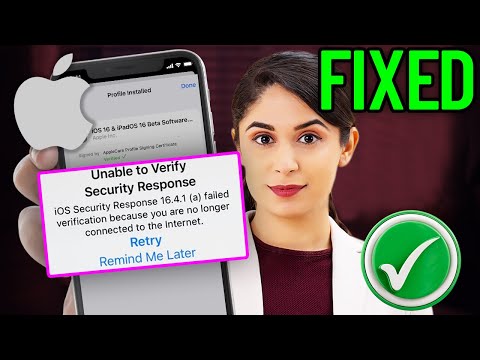
3. You'll be prompted to restart your device. A quick restart is necessary for the RSR to take effect.
Verifying Installation and Understanding Versioning
After the restart, return to Settings > General > About. Your iOS version should now read "iOS 16.4.1 (a)". The presence of the "(a)" suffix confirms the successful application of the Rapid Security Response. It's crucial to understand that without this suffix, your device remains vulnerable to the specific zero-day exploit addressed by this patch.
Why This Matters to You (and Your Organization)
For individual users, failing to apply 16.4.1 (a) leaves your device exposed to an active threat. Given the prevalence of WebKit-based browsing, the risk of encountering a malicious site exploiting CVE-2023-28206 is non-trivial. For enterprises, the stakes are even higher. Unpatched devices represent significant vectors for data breaches, corporate espionage, and network compromise. Organizations leveraging Mobile Device Management (MDM) solutions should have policies in place to automatically or quickly push RSRs, ensuring their managed fleet is protected against such critical, time-sensitive threats. Compliance requirements, risk assessments, and robust patch management strategies must all account for the rapid deployment cadence of RSRs.
Pro-Tip: RSR Removability and Its Implications
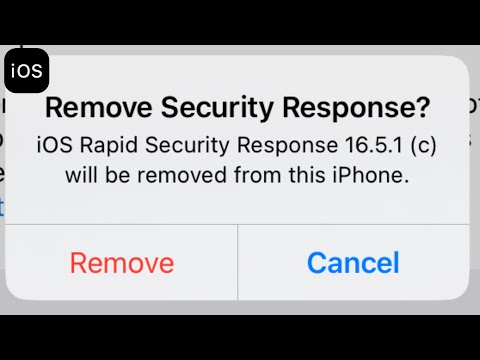
A lesser-known but critical aspect of Apple's Rapid Security Responses is their removability. Unlike standard iOS updates, RSRs can be uninstalled from an iOS device by navigating to Settings > General > About, tapping the iOS Version, and selecting "Remove Security Response". While this feature is primarily designed to address rare compatibility issues, it introduces a potential security risk. A malicious actor with temporary physical access or a sophisticated malware payload could theoretically remove an RSR to re-enable a patched vulnerability, making the device susceptible to re-exploitation. Organizations should actively monitor RSR status via MDM and implement policies that prevent users from removing these critical patches, or at least flag such actions for immediate review. Furthermore, consider subscribing to Apple's security update RSS feeds and integrating RSR deployment into your automated enterprise patch management workflows for maximum protection.
FAQ: What is the difference between an RSR and a regular iOS update?
RSRs are smaller, highly focused patches for critical vulnerabilities, often zero-days, requiring only a quick restart. Regular iOS updates are larger, comprehensive packages that include new features, bug fixes, and numerous security patches, typically requiring a longer installation time.
FAQ: Can I ignore 16.4.1 (a)?
Ignoring 16.4.1 (a) is strongly ill-advised. It addresses an actively exploited zero-day vulnerability. Your device will remain susceptible to attack if the RSR is not installed, posing a significant risk to your data and privacy.
FAQ: How do I know if the RSR was successfully installed?
After installation, go to Settings > General > About. Your iOS version should display as "iOS 16.4.1 (a)". The "(a)" suffix confirms successful application.
FAQ: Can an RSR be rolled back?
Yes, RSRs can be removed by navigating to Settings > General > About, tapping the iOS Version, and selecting "Remove Security Response". However, this action is generally not recommended as it re-exposes your device to the vulnerability the RSR was designed to patch.
Conclusion
The release of iOS Security Response 16.4.1 (a) serves as a stark reminder of the continuous, dynamic nature of digital threats. Apple's proactive adoption of RSRs is a commendable step towards rapidly neutralizing critical vulnerabilities that previously would have lingered until the next major point release. For both individual users and enterprise IT administrators, the message is unequivocal: prompt application of these security responses is non-negotiable. As 'Smart AI Fix' has consistently advocated, vigilance and adherence to best practices in software updates are the bedrock of a robust security posture in an increasingly interconnected and threat-laden digital world. Keep your devices updated, verify their security status, and never underestimate the impact of even a seemingly minor "a" suffix.
